

Best WordPress Membership Hosting
Making a successful membership site on WordPress is not as simple as picking out a membership plugin and installing it on any hosting account. Membership websites face certain technical requirements that normal shared hosting plans do not typically support.
These requirements include things like page caching that is specific to the user, user login, content access restriction, and recurring payment processing.
Many site owners find it is too late, but the $10 + per month hosting plan causes performance issues. In fact, members get an error logging in, while others get frustrated when unable to access their paid content. A membership site runs many more database queries and server requests than a simple brochure site. That’s because every time a page loads, it must check if the person is a member and serve customized content.
This guide explains what hosting requirements membership sites have and names providers equipped to deal with these technical issues. The article unpacks cost expectations, explains how aggressive caching creates problems for member areas and reviews hosting companies that give a fine-tuned emphasis on WordPress membership platforms.
Picking The Right Hosting For Your Membership Site
Selecting a proper hosting provider is crucial for your membership site. Membership sites require more resources than a standard WordPress blog. It does user authentication, content restriction, and access to member-only areas.
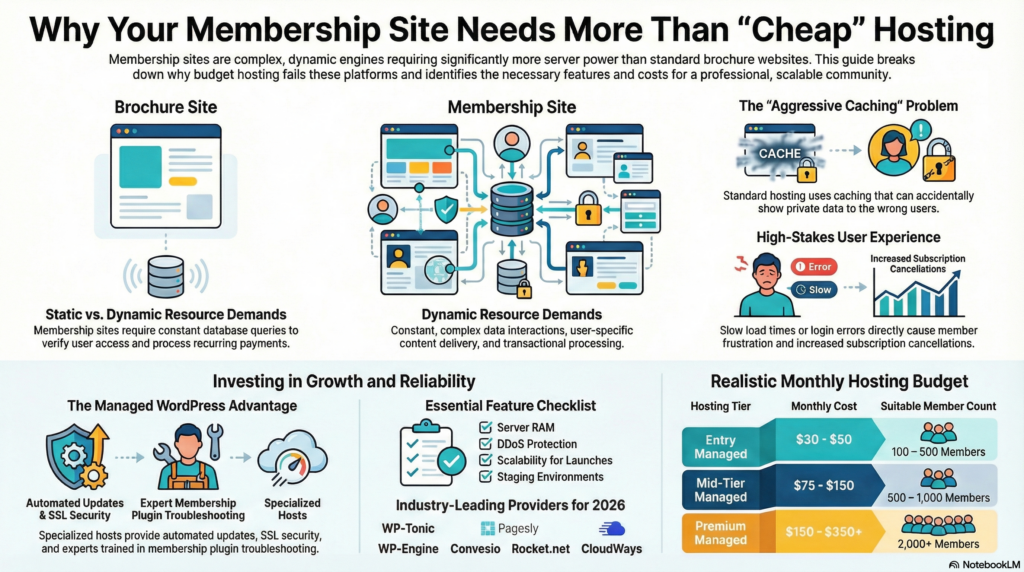
Managed WordPress hosting is the top option for membership sites. These hosting companies focus on WordPress and provide automatic updates, better security, and expert support. Managed hosts take care of technical issues, letting site owners focus on content and members.
Key hosting features to consider:
- Server resources: Memory and CPU power to handle concurrent logins
- Security measures: SSL certificates and regular backups
- Scalability: Ability to grow as membership base expands
- Plugin compatibility: Support for membership plugins and payment gateways
A small membership site just starting out can get away with shared hosting, but as membership sites grow, they often need dedicated hosting or managed WordPress hosting. A hosting plan must handle surges in traffic when content is launched or a promotion is launched.
WordPress-focused hosting companies understand the requirements of membership sites. They optimize WordPress databases and troubleshoot membership plugin problems by enhancing server configurations.
Having a service provider with a guaranteed uptime is essential. People want to see their paid content immediately so we can’t afford slowness. A sluggish or unreliable web host damages member satisfaction and retention rates.
Site owners need to assess their hosting choice based on present requirements and future growth. A proper hosting plan can back the membership features without causing technical issues or performance issues.
The Main Differences Between A Membership & Brochure Website
A brochure website is a digital card of the business that depicts static information of the business, its services and contact information. No visitors will have to log in or register to access the same content.

A membership site is a site that requires users to create an account and log in to gain access to exclusive content. With this model, visitors are given repeat associations rather than one-off ones.
Key Structural Differences:
| Feature | Brochure Website | Membership Website |
|---|---|---|
| Content Access | Public and open | Restricted by membership level |
| User Accounts | Not required | Required with login credentials |
| Revenue Model | Lead generation | Recurring subscriptions |
| Content Updates | Occasional | Regular and ongoing |
| User Interaction | Minimal | Community features and engagement |
A brochure website consists of 5-10 static pages with very few changes. Membership sites require dynamic content management systems that allow for user profiles and payment processing while delivering content based on access levels.
The technical requirements differ significantly. Membership sites need plugins or platforms to manage user registration, payment gateway, content restrictions, and members. Brochure sites can run on less sophisticated hosting and content management systems.
Membership platforms build ongoing value on the back of courses, forums, articles and downloads. Brochure websites try to get a website visitor to not just visit but also get in touch, either through a contact form submission and or a quick call to action.
It depends on the business if it wants the people to generate leads or wants to build a reoccurring revenue stream with protected content.
Cheap Hosting Is Typically Not A Good Option
Cheap hosting services usually cannot meet unique requirements of membership sites. Websites and applications need to be constantly up and running to protect members’ information and provide them with content.
Critical limitations of cheap hosting include:
- Poor performance – Slow loading times frustrate members and increase abandonment rates
- Limited resources – Insufficient bandwidth and storage create bottlenecks as membership grows
- Weak security – Basic protection leaves payment information and member data vulnerable
- Minimal support – Long response times and limited expertise delay issue resolution
Server resources are often oversold by shared hosting providers. When dozens or even hundreds of sites compete for the same resources, performance suffers during peak traffic times.
Membership plugins require enough server memory and processing power to handle user authentication, content restriction, and payment processing. Budget hosts usually put in very little effort which can’t perform these tasks.
Cheap hosting doesn’t save you that much downtime is expensive. If your membership site goes down, members cannot access paid content, and new signups totally stop. This directly impacts revenue and damages credibility.
Database optimization is important for membership sites. These platforms constantly poll databases for access permissions and personalized content delivery. Cheap hosts often don’t have the database performance for smooth operations.
Security vulnerabilities pose severe risks. Membership sites deal with confidential information like payment and personal data. Budget-friendly hosting services may not provide security measures which protect vital information.
The Most Important Hosting Features For A Membership Website
Not every hosting service has the features necessary to run a membership website. The server must deal with repeated requests for logging-in, payment processing, and restricted content.
Membership platform need performance specifications more than ever. A hosting plan ought to possess enough processing power as well as RAM to enable concurrent user sessions. Websites with active members will need dedicated resources, not a shared hosting environment with other websites using bandwidth.
Security features protect both site owners and members. Essential security elements include:
- SSL certificates for encrypted data transmission
- Regular automated backups to prevent data loss
- DDoS protection to maintain uptime
- Firewall configurations to block malicious traffic
The number of people who can use the content at the same time depends on bandwidth and storage capacity. Sites sharing video courses or downloads need higher allocations than text-based ones.
Creating a membership site with scalability options means your membership site will be able to grow with no migration pains. Typically, managed WordPress hosting providers allow site owners to seamlessly upgrade tiers as their membership base grows.
A COMPLETE STEP-BY-STEP CHEATSHEET
TO CREATING, LAUNCHING & GROWING A SUCCESSFUL MEMBERSHIP WEBSITE

Database optimization tools keep site speed up as member data grows. If you implement the proper database management system, your queries about users, user membership level, and access permission won’t slow down.
When payment processing fails, or login systems malfunction, quality of technical support is crucial. WordPress specialist hosting companies understand membership plugin architecture and can fix integration problems fast.
The speed at which target audiences load your site depends on where your server is located. If you have more than one data centre to choose from, you can choose your server to be the closest to your primary member base.
Expect Quality Hosting To Start At $30 – $100 Per Month
When planning a Wordpress membership site, it is essential to budget for hosting realistically. The cost of quality managed WordPress hosting typically ranges from $30 to $100 per month for memberships sites that experience moderate traffic and performance requirements.
What This Price Range Includes:
- Dedicated resources for membership site functionality
- Enhanced security features and SSL certificates
- Automatic backups and staging environments
- Performance optimization for database-heavy membership operations
- Technical support from WordPress specialists
Membership sites cannot thrive on shared hosting with $10-25 monthly pricing. Membership plugins need capabilities like database queries, user authentication, and content restriction which these platforms cannot manage.
The specific cost depends on several factors. Websites with 100-500 “active” members usually run well at $30 to $50 a month. Membership platforms that serve thousands of user, often require plans in the $75-$150 range or higher.
Key Performance Indicators:
| Hosting Tier | Monthly Cost | Suitable For |
|---|---|---|
| Entry Managed | $30-50 | 100-500 members |
| Mid-Tier Managed | $75-150 | 500-1,000 members |
| Premium Managed | $150-350+ | 2,000+ members |
At this price point, hosting providers offer a managed WordPress environment configured for membership sites. They are responsible for server oversight, including security patches and performance monitoring. Site owners can focus more on content creation and member engagement (rather than worrying about technical infrastructure).
Aggressive Caching Is A Real Problem For A Membership Website
Caching creates static pages which enable a faster loading speed for visitors. By default, most WordPress hosting providers utilize aggressive caching for all sites on their servers for performance gains.
This causes many problems for membership sites that use dynamic content that personalizes itself. When a hosting provider caches pages too frequently, members will see outdated information or information belonging to others.
Common problems caused by aggressive caching include:
- Members seeing login pages even after authentication
- Restricted content appearing to non-members
- Member dashboards displaying incorrect user data
- Payment pages showing cached transaction information
A managed WordPress host will apply caching at the server level to all pages on your website. Owners of membership sites must exclude certain pages and user roles from caching. The membership plugin will not work without the correct configuration.
Most hosting companies supply cache solutions optimized for normal WordPress sites, and not membership ones. Website owners need to make sure their hosting plan allows detailed caching controls. Hosting services should allow exclusions for members-only pages, user profiles, and the checkout process.
The rules of caching apply to more than one website in shared Hosting. Managed WordPress hosting gives you more control over your caching. But, even the premium hosting companies may allow their default caching to be turned on.
Once you have enabled any of your caching solutions make sure to test your membership features properly. They must verify that logged in users are seeing the right content and that restricted pages remain protected.


