
NotebookLM for Content Creation: How AI Tools Are Transforming Business
Ensuring consistent quality while re-purposing for multi-type media is a constant issue for content creators. NotebookLM employs advanced AI processing to change your documents, videos, and audio files into customized formats, such as podcasts, summaries, and transcripts. This Google-based tool removes the manual content transformation work.
The platform supports multiple source types and generates various outputs according to user specifications. Teams can upload the training materials, business documents, or previous content which then get converted into new formats without the need to recreate them.
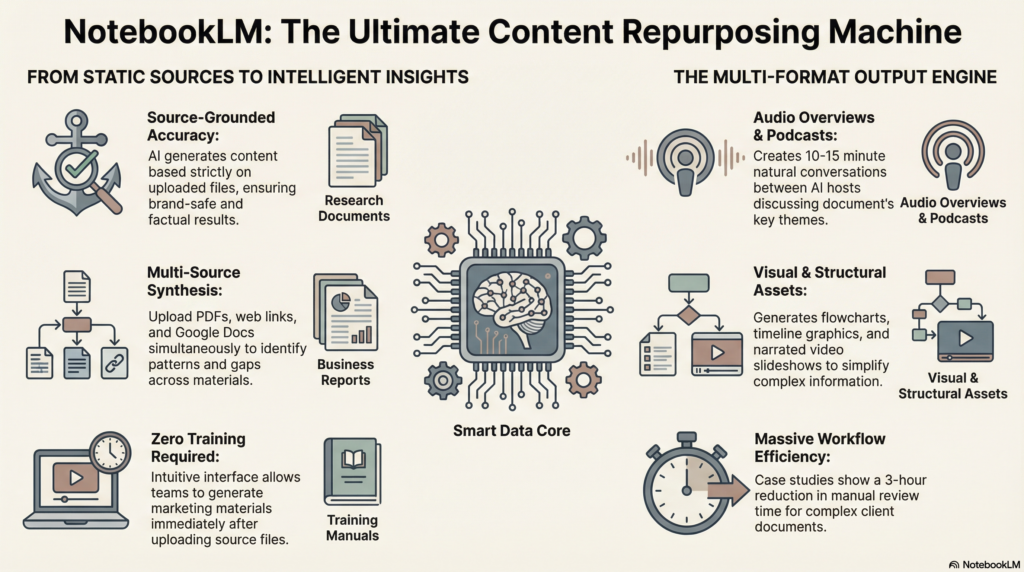
Businesses save great hours of time while getting the word out with real-world applications. The automation and customization ability of the tool makes it an integral part of modern content infrastructure.
NotebookLM The Content Machine
NotebookLM changes the way creators work by automating different stages of the production process. Users can directly upload files, PDFs, and web resources. The AI makes a summary out of these materials, extracts key insights and generates new content types.
The tool excels at repurposing existing content across different media. A single research document can become:
- Podcast transcripts
- Video scripts
- Social media posts
- Blog articles
The way NotebookLM integrates sources distinguishes it from regular AI. The data in ChatGPT can be customized based on user input. It guarantees a correct and consistent approach with the brand.
The platform’s automated processes save content creators a huge time. The outputs generated by the system need little editing. Users can change the tone and format as per their needs.
You can create your own podcast without requiring recording gear. The AI creates real sounding conversations from the uploaded content. This feature allows creators with no technical know-how and no access to a studio to produce podcasts.
NotebookLM simplifies content workflow for business teams across departments. The platform’s processing powers the creation of marketing materials, training papers and internal communications. The tool is compatible with many file types and connects to already, deployed Google Workspace environments.
Training needs are negligible due to design of intuitive interface. Content can be generated immediately after uploading source materials. The site can attend to all of the technical complexity while the creators worry about strategy and distribution.
What Is NotebookLM?
NotebookLM converts documents into interactive audio conversations, visual summaries, and analysis reports. Users can upload many types of files to create anything from a podcast-style conversation to a structured mind map.
Audio Overviews
NotebookLM generates discussions between two AI hosts like a podcast. The hosts check the documents and discuss the important findings in a natural way.
People upload PDF, textual file and web link. The materials are processed by the system to produce audio conversations of 10-15 minutes. The AI hosts offer essential concepts, debate differences, and clarify difficult ideas.
Audio features include:
- Natural conversation flow between hosts
- Background music and transitions
- Emphasis on key points through tone
- Multiple speaking voices for engagement
Audio fits well with busy professionals who prefer listening on transit. The overviews help content creators understand the source material before they write scripts.
Video Overviews
Video summaries merge visuals with analysis that’s spoken. NotebookLM generates slideshows with AI-generated narration on document highlights.
The videos include clear text summaries, charts and key quotes from source materials on a clean layout. Users can design the looks and length of presentation slides based on complex content.
Video components include:
- Synchronized slides and narration
- Visual hierarchy with headers and bullet points
- Quote highlights from source documents
- Customizable color schemes and fonts
Marketing teams use video overviews for client presentations. Researchers create summaries for stakeholder meetings without manual slide creation.
Infographics
NotebookLM creates infographics by summarizing documents. Visuals are great for conveying complex information in an easy way that works for online and on-screen media.
It makes flowcharts, comparison tables, and timeline graphics. Some parts or themes chosen by users for generation Output formats of PNG and SVG files.
Image types available:
- Process flowcharts
- Comparison matrices
- Statistical summaries
- Timeline visualizations
Content marketers repurpose research documents into shareable graphics. Educators use info images to simplify technical concepts for students.
Document Analysis On Steroids
This advanced analysis provides insights beyond summarization. NotebookLM analyzes your uploaded documents for patterns, contradictions, and gaps.
The system analyzes documents side-by-side and highlights differences. It creates citation maps that show the relationships among sources and the strength of claims.
Analysis features include:
- Cross-reference detection between sources
- Fact verification across documents
- Gap identification in coverage
- Source reliability scoring
For case preparation, legal teams use document analysis. Business analysts compare reports to analyze the market for discrepancies.
Customised Reports
Users create structured reports tailored to specific audiences and purposes. NotebookLM adapts tone, detail level, and focus areas based on user requirements.
The users prepare structured reports for specific audiences and purposes. NotebookLM’s style, detail, and area of focus fully aligns with your needs.
The report template includes summary, analysis and educational materials. The formatting remains consistent in the system, including source and evidence.
Report customization options:
- Audience level: Executive, technical, general public
- Length: Brief summary to comprehensive analysis
- Focus areas: Specific themes or topics
- Citation style: Academic, business, or informal
Consultants generate client reports from research materials. Academic researchers create literature reviews from multiple papers.
Mind Maps
Visual relationships within documents, interactive mind maps make accessing a document easy. NotebookLM can create hierarchies outlining main topics, sub-topics and links.
Users can burst any branch of their interest to narrow their focus. The maps contain links you can click to go back to the source documents’ sections.
Mind map features:
- Hierarchical topic organization
- Color-coded categories
- Clickable source links
- Exportable formats
Project managers employ mind maps for strategic planning and stakeholder engagement. Study guides are assembled by students from texts and lectures.
Evergreen Note-Taking
NotebookLM allows users to maintain knowledge bases that can be updated continuously. The system connects the new uploads with existing materials to create mega libraries.
Smart tagging and categorization for easy information finding. The tool recommends additional content and identify the knowledge gaps that will appear later.
Note-taking capabilities:
- Persistent document storage
- Smart content linking
- Automated tagging systems
- Search and filter functions
Researchers build ongoing literature databases. Business teams maintain competitive intelligence repositories that grow over time.
How Does NotebookLM Work?
NotebookLM is a Google-powered AI research assistant which makes uploaded documents an interactive knowledge base. Users submit a variety of source materials including PDFs, text files, Google Docs, and articles online to create a notebook.

The tool leverages sophisticated language models to analyze and synthesize content from this data. It produces summaries, responds to queries, and establishes relationships between information fragments in the uploaded documents.
Key operational features include:
- Document upload and processing from various file formats
- Automatic content analysis and indexing
- Question-answering based on source materials
- Summary generation for individual documents or collections
- Audio overview creation that sounds like a podcast discussion
This platform produces outlines, study guides, and briefing documents from the material. Users can inquire about their content and receive answers based on their uploaded documents rather than general knowledge from the web.
NotebookLM’s audio feature turns text into interactive conversations. In a podcast fashion, two AI hosts make it easier to consume the material.
A COMPLETE STEP-BY-STEP CHEATSHEET
TO CREATING, LAUNCHING & GROWING A SUCCESSFUL MEMBERSHIP WEBSITE

The system keeps source attribution by referencing particular documents in its answers. This confirms that people can check such information and get back to original sources for better research.
Users have the ability to specify the format or area of focus for the output creation. This tool stores interaction history. Using this tool, you can build on an earlier query in the same notebook.
Case Studies
NotebookLM uses workflows to turn various content types into an output. Users can summarize documents into audios, analyze complex pdfs, and enhance academic papers with AI powered feedback.
Audio Summary Podcasts
Content creators upload numerous documents to NotebookLM that produces conversational podcast-style summaries. The AI generates natural speech between two speakers discussing the key messages from the content.
When a marketing agency uploaded five client case studies they received a 12-minute audio summary. Different campaigns revealed similar patterns of success. Saved three hours of manual review time.
This tool can simultaneously convert multiple PDF, Word documents, Ascii text files, and images. Prior to generating the images, users can add specific prompts to use.
Key benefits include:
- Natural conversation flow between AI speakers
- Automatic identification of main themes
- Time-stamped sections for easy navigation
Analyzing PDF
Researchers and business professionals upload highly complex PDF documents for product analysis and summary generation. NotebookLM generates structured outputs from lengthy reports and extracts suites of information.
The system effectively manages technical documents, financial statements, and research papers. It ensures accuracy by providing page numbers for all quoted information.
Organized user answers with distinct sections and highlighted data points that require attention.
Use NotebookLM To Improve Your Paper
Scholars submit draft essays and receive feedback on structure, coherence, clarity, and strength of argument. AI highlights inconsistencies in reasoning and recommends ways to enhance academic rigor.
The chapter of a graduate student’s thesis was uploaded and it was recommended differently. NotebookLM stated the transitions between paragraphs are weak, and supported claims need better evidence. The feedback provided other ways to phrase difficult ideas.
A tool that finds missing citations through patterns. The methodology section was clear but could be stronger in places. And the conclusion could benefit from further clarifications.
Writers can upload more drafts to examine improvements over time and ensure chapter quality remains consistent.
NotebookLM Will Become An Indispensable Tool
The NotebookLM is a significant change in the way professional content and knowledge is created. This platform is superior to other AI tools because it can assimilate multiple sources at once.
Key capabilities that drive adoption:
- Upload and analyze documents, PDFs, and transcripts
- Generate summaries from complex materials
- Create audio content from written sources
- Customize outputs for specific business needs
NotebookLM’s repurposing features are valuable for content creators. They can turn long-winded papers into scripts for podcasts or a transcript of a meeting into something useful.
The tool automates workflow with the help of google services. Users can upload training materials and generate various formats without having to switch pages.
NotebookLM is revealing efficiency of business teams. The platform helps cut down the time spent on manually processing the content and also maintaining accuracy across different output formats.
NotebookLM Works More on User-provided Sources Than ChatGPT. This concentration leads to more reliable and relevant outcomes for particular projects.
The audio generation of the platform unlocks fresh avenues for content distribution. Organizations can develop training materials, presentations, and teaching notes with little manual effort.
NotebookLM is gaining acceptance in various sectors as organisations observe improvements in workflows. This tool deals with the content creation and knowledge management pain points that generic AIs are not equipped to handle
Final Thoughts
NotebookLM is a powerful tool for AI-generated content creation. Unlike ChatGPT and other conventional AI assistants, the platform can operate on several sources at one time.
Content creators can utilize the NotebookLM multi-source processing offers to create comprehensive material. The tool is capable of summarizing, transcribing, and converting documents to audio.
Key advantages include:
- Seamless Google integration for file management
- Advanced source synthesis capabilities
- Automated transcript generation
- Custom audio output options
The platform helps save a lot of time in content workflows. Users can upload training data, research papers, or reference files to generate specific outputs. This method helps avoid the repetition of entering data into AI tools manually
NotebookLM’s framework allows you to repurpose content in different formats. One source document can produce a written summary, an audio discussion, and a report. Due to this, it becomes essential for businesses with many channels.
The tool is specifically useful for podcast creation and video content creation. Users can add scripts, research notes, and background materials for easy output generation. Less need for manual editing due to automation features.
Content creators must check out NotebookLM if they deal with huge sources. The platform’s strength is in creating a secondhand synthesis rather than first hand writing. This makes it perfect for research and educational content creation.


