

Summary
Learning Management Systems (LMS) are the foundation of a course creator’s business and deserve thorough consideration. While Jonathan reviews the top LMS Plugins in this post, it is crucial to select the platform that meets your specific needs, and has the chops to grow as your project expands. Long ago, access to a shared drive on Google Docs could have been thought of as online learning. Now the expectations of consumers has grown, and they expect Course and Lesson structure, certificates, messaging, community and more.
Join WP-Tonic on this journey through our top choices and consider which package suits you best.
Best WordPress LMS Plugins
The WordPress learning management system plugins have become a must-have for anyone looking to develop and sell online courses on their website. These specific plugins, installed on your WordPress site, turn it into an online education platform. These will help you build courses, manage students, take payments, and create marketing materials as well.
While some of the plugin options may provide a core version that is free, to cover basic functionality, premium features usually unlock things including detailed analytics, other integrations, and enhanced customization.
LifterlMS, Creator LMS, and LearnDash are popular picks, and each brings different advantages to the table.
Knowing which features are most relevant for a particular website and learning goal is essential. If you are not sure yourself at the start, this is a great time to consult an expert and discover the real range of options you have.
What Are The Key Features You Need From LMS Plugins?
A good LMS plugin should have certain capabilities to deliver online courses so that it can create a course, assessments and take payments.
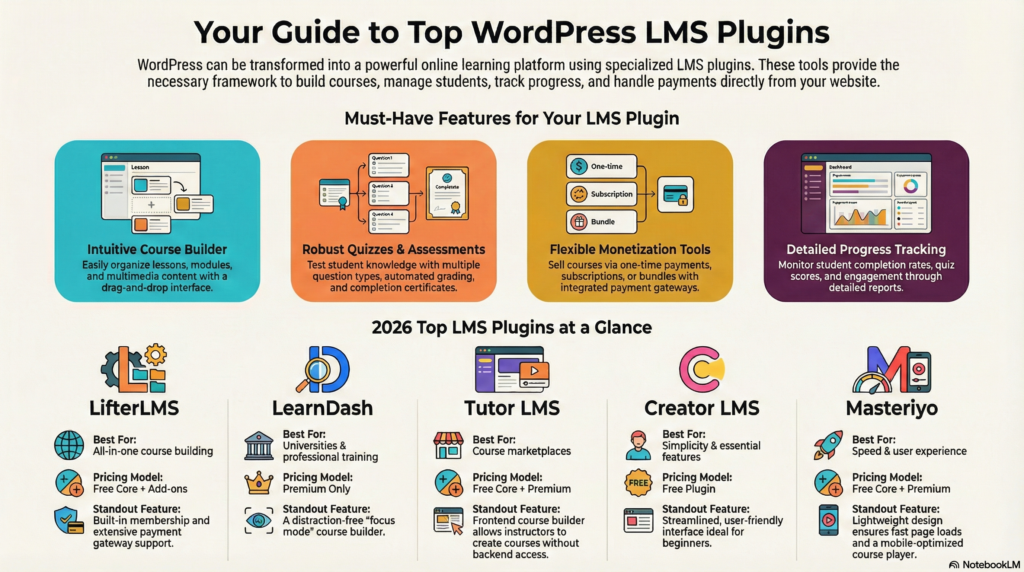
It depends. Do you just need to deliver a course or do you also want to provide group training and analytics? Another key consideration is the obligation to report. Do you have a managing body that will need to see Student Reports for progress, grades and the like?
Lets’ look at some basic features…
Course Builder
The course builder determines how quickly you can create and organize educational content. A visual drag-and-drop interface lets you arrange lessons, modules, and topics without coding knowledge. Look for plugins that support multiple content types within a single course, such as video uploads, audio files, downloadable PDFs, and embedded content from external platforms.
The builder should allow you to preview courses as students see them before publishing. Bulk editing capabilities save time when managing multiple courses. However, at the same time, you want to be able to treat courses in your catalog independently.
Some plugins offer course templates or the ability to duplicate existing courses as starting points. This is a great time-saver, and if you are a creator who has many courses to create, can be a life-saver.
The interface should clearly display the course structure in a hierarchical view, making it easy to reorder lessons and nest content within modules.
Quizzes and Assessments
This is the part of the LMS that assesses information about students’ understanding and learning progress. Basic quiz features support Multiple Choice Questions (MCQ), true/false, and fill-in-the-blank question types. While advanced plugins and extensions allow for exam essay questions, assignment file uploads, and practical assessments requiring skills demonstration.
Question banks allow you to store reusable questions and randomize the content of quizzes to prevent students from sharing quiz answers. NOTE – Different plugins address question banks in different ways. Some contain the question banks for individual areas of the syllabus, while some require all the quiz questions to be in a large bank and selected for each quiz from the bank.
This affects your workflow if you have a lot of testing in your courses, and should be strongly considered if you have a distinct workflow that requires one or the other. For personal preference, I prefer that each quiz bea maintained seperately in the database and the Question Bank is relegated to that section of the syllabus. It feels more organized to me. a
You can impose time limits for quizzes, randomize the order of answers, and set a passing score. The Automated grading is effective for objective types of questions, but there should be manual review options for subjective types.
Generating a certificate upon quiz completion will help students get certified.
Access Control For Memberships
Access control determines who can view certain courses and content. Great LMS tools allow you to control access to learning content at a granular level.
- Pre-requisites
- Paid Access
- Drip (time delays)
- Pass/Fail progress restriction
- Course enrollment dates
- Course access availability dates
If your learning needs are done in a certain order, you would enable prerequisites. To access a particular course, you need to complete certain pre-requisite course. This creates a blueprint of learning through which, step-by-step, skills are developed.
Membership tiers allow you to package your courses differently with different prices. While the better platforms incorporate member tools in their core, others require workarounds to better manage the flow of students to your content.
Integration with membership plugins of WordPress expands these features.
Private courses are hidden from general listings and can only be enrolled in manually or via special invitation codes, or direct links.
Drip-feed scheduling rolls out lessons on set dates or by a student’s enrolment time, preventing the bingeing of lessons. This is a great feature when you are running hybrid trainings or cohorts and trying to keep the class on a schedule.
Progress Tracking and Reporting
Progress tracking shows how students advance through the course material. Students can see their completion percentage, the number of badges earned, and the lessons left for the course inside their dashboard.
Instructor reporting and the depth of student reporting vary by platform. However, the report for each student shows their quiz scores, and completion rate of individual modules. Analytics across the class highlight which lessons are the most difficult or where students drop out.
With Export functionality, you can download the reports in CSV or PDF format for record-keeping. Data is updated in real time to always see the status of the student.
Proper use of reporting provides indicators of students who are struggling and need help.
Team and Group Training
Company learning and collaborative education are supported by group training features. Instructors can assign a course to teams or departments all at once, rather than just individuals. Managers or group leaders are typically assigned reports on group activities.
They are able to see which teams have completed the necessary training and who needs a follow-up. Some platforms allow for this through the “front-end” using designated pages. Others require a user role in WordPress for the group leaders to access their groups reporting.
Certain plugins make organizational pricing available and allow groups to pay per seat or in bulk.
Private Areas (LifterLMS)
Private areas create exclusive spaces for Instructor and Student communication. It allows the communication to be isolated from all other students and users while still constrained to the platform. This is perfect for organizations that do not want communications to occur off-channel.
Student Dashboard
For students, student dashboard is the central hub where learners access the enrolled courses, grades, and achievements.
A COMPLETE STEP-BY-STEP CHEATSHEET
TO CREATING, LAUNCHING & GROWING A SUCCESSFUL MEMBERSHIP WEBSITE

Community/Discussion
Many course creators are learning that community is becoming an expectation in the online learning arena. User experience is a key consideration. A non-technical user should be able to perform administrative tasks using these interfaces.
Private forums or discussion board allows students to interact beyond the lesson and course structure. These spaces prompt questions and peer support.
Certain plugins have tools baked in, while others can be integrated with BuddyPress, Fluent Community, or bbPress for better community features.
Member-only resource libraries can be added for materials, templates, or bonus content.
Checkouts and Payments
Payment processing converts course visitors into paying students.
By pre-integrating payment services such as Stripe, PayPal and Square, we eliminate the need for additional plugins. Having several pricing models provides flexibility.

Standalone courses usually work well with a one-time purchase option while subscriptions work well for ongoing programs. By allowing installment payments, payment plans help reduce barriers to enrollment.
The functionality of coupon and discount code supports promotion activities. Create discount coupons with percentage or fixed amounts along with expiry and usage restrictions.
Bundle pricing motivates students to enroll in multiple courses at lower rates.
WooCommerce integration lends familiar checkout and more payment options.
Stability and Performance
Plugin stability affects site reliability and user experience. So choosing well-coded plugins that follow WordPress best practices and receive regular updates for security patches and compatibility is the way to go.
This ensures courses that include videos load quickly and can reach large numbers of students, scaling with your needs.
When you add more courses and users, efficient database queries ensure no slowdowns. This is where you may choose to consult with a hosting expert. Experts can assist with compatibility on caching plugins, CDNs, and the like to help speed up the page.
Using other important plugins can be problematic for your maintenance, as they conflict with each other. Again, this is something an expert can help guide you with.
Cost of Ownership
The true cost extends beyond initial purchase price. Many free plugins need paid extensions for certificates, advanced quizzes, or specific payment gateways, among other things.
The yearly fee for updates and technical support adds to the cost over time.
Some plugins are per-site licenses, while others allow unlimited. So if you have a larger scale of learning in mind… You may want to consider tools that can expand with you.
Course sales transaction fees cut down revenue from each enrollment.
When you require features that are not included in the base packages, you incur development and customization costs.
When estimating a timeline, be sure to consider the time spent learning the plugin interface and migration of content from other services.
The effectiveness of your support team can influence how rapidly you fix revenue-affecting issues.


