

Best Online Course Platforms in 2026:Choosing the Right Solution for Your Business
The online course industry continues to expand in 2026, with platforms offering increasingly sophisticated tools for course creators and educators. Selecting the right online course platform directly impacts how effectively creators can build, market, and sell their courses while shaping the overall learning experience for students.
The variety of available platforms means course creators face important decisions about features, pricing, and business models.
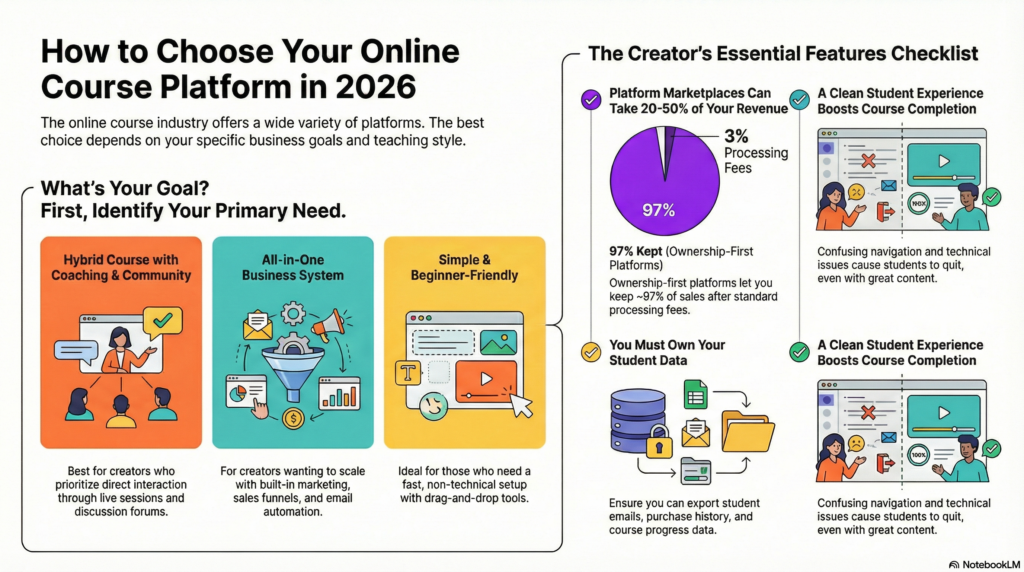
Different platforms serve different needs, from individual instructors launching their first course to established businesses scaling their online education offerings. Some platforms provide all-in-one solutions with built-in marketing and payment processing, while others focus on course delivery and learning management. Understanding these distinctions helps creators align their platform choice with their specific goals.
How To Choose The Best Platform For Your Course In 2026
The right platform depends on whether course creators prioritize community features, need comprehensive business tools, or want a straightforward setup without technical complexity.
If You Want A Hybrid Course With Coaching And Community
Platforms that combine course content with coaching features and community spaces work best for creators who build learning experiences around direct interaction. These systems typically include video hosting, discussion forums, and scheduling tools in one interface.
Key features to look for:
- Built-in community forums or membership areas
- Live session scheduling and video conferencing integration
- Direct messaging between instructors and students
- Progress tracking that connects to coaching milestones
Platforms like Kajabi and Mighty Networks offer these capabilities without requiring multiple software subscriptions. The course content sits alongside community discussions, which helps students stay engaged beyond watching videos.
Creators who run cohort-based courses or group coaching programs benefit from platforms that display both scheduled events and self-paced material. The platform should allow students to access course material, join live calls, and participate in discussions from the same dashboard.
If You Want An All-In-One Business System
Some platforms handle course hosting, email marketing, payment processing, and customer management through a single login. These systems eliminate the need to connect separate tools for different business functions.
Core business functions typically included:
- Email automation and marketing campaigns
- Sales funnels and checkout pages
- Affiliate program management
- Analytics and revenue tracking
- Student relationship management
Platforms like Thinkific Plus and Teachable’s business plans provide these integrated features. Course creators can send promotional emails, process payments, and deliver course content without switching between applications.
The trade-off involves cost and complexity. All-in-one platforms charge higher monthly fees but reduce the total spent on separate marketing and sales tools. Creators running multiple courses or planning to scale their course business find value in unified systems that track student data across products.
If You Want Something Simple And Beginner-Friendly
Platforms targeting beginner course designers focus on quick set-up not complicated features. People can upload videos, develop a basic lesson and start selling courses within hours instead of days using these options.
Simplified platforms typically offer:
- Drag-and-drop course builders
- Pre-designed templates for course pages
- Basic payment integration with Stripe or PayPal
- Minimal required settings and configurations
Podia and Thinkific’s starter plans include this help. The interface will walk the user through the steps of course creation without the need to make complex settings decisions. It’s very easy to create a course with our platform. Writers require no technical knowledge to add videos, write descriptions, set pricing, and much more.
To keep it simple, we limit customization options. While you won’t be able to change the layout of your page in any meaningful way or add in any custom code, you can launch a fully functioning course. You probably won’t need a developer to do this, nor will you need to watch lengthy tutorials.
Key Features You Need In A Course Platform
The core functions of a course platform might hinder or help a creator in their business. A suitable mix of proper ownership, features, flexibility in design, and good experience of the users separates the platforms which scale from the ones which act as a barrier.
Maximum Ownership
The creator has complete ownership over the content, student data, and business relationships, without interference from the platform. There are a few platforms that describe themselves as marketplaces as they own the student relationship and take away a significant portion of your revenue. Platforms enabling creators to turbocharge their branding, communicate with the students, and take business decisions independently.
Marketplaces owned by the platform charge between 20 to 50% of course revenue. Self-hosted or dedicated platforms allow the creator to keep 100% of sales, minus the payment processing fees (generally between 2.9% and 3.5%).
The difference has long-term business viability. A creator who sells $10,000 a month in courses keeps anywhere from $5,000 to $8,000 on marketplaces. However, on ownership-first platforms he retains $9,650. Over the course of a year, this equals $19,800 and $115,800.
All-In-One Features
By encapsulating course hosting, payment processing, email marketing and student management into a single platform you save on software costs. Using separate tools can lead to integration challenges and increased monthly expenses.
Essential all-in-one components include:
- Course hosting with unlimited video storage and bandwidth
- Payment processing supporting multiple currencies and payment plans
- Email marketing with automation sequences and broadcast capabilities
- Student management including enrollments, progress tracking, and certificates
- Community features like discussion forums or member spaces
- Analytics and reporting for sales, engagement, and completion rates
Platforms without these features make creators link other services through zapier or other similar features. These integrations often malfunction, necessitating tech fixes, and cost an extra $50-$200 a month in software.
Flexibility Of Design
The flexibility of design decides whether a course platform will allow you to customize your brand or impose templates on every creator. Custom branding aids acknowledgment and differentiates courses in competitive market.
You can upload logos and change colors with basic customization. Advanced flexibility provides custom CSS and page builder along with complete theme control The ideal platforms offer drag-and-drop editors that need no coding knowledge yet have developer access for users who want it.
Mobile responsiveness is essential in 2026 with nearly 60% of online courses being accessed via mobile. Platforms should change layouts, video players, and navigation to fit smaller screens automatically, not with different mobile versions.
Overall Functionality
Core functionality refers to how reliably lessons reach students. Slow loading times, video buffering, payment fails and other technical performance issues affect completion rates and refund requests.
To account for the variances in internet speeds, video delivery should be adaptive. Course navigation should proceed logically with a completion indicator and locked content. The drip content scheduling enables the creators to deliver the lessons after a specific date.
A COMPLETE STEP-BY-STEP CHEATSHEET
TO CREATING, LAUNCHING & GROWING A SUCCESSFUL MEMBERSHIP WEBSITE

Assessment tools are significant for courses that require verifying knowledge. A quiz builder should have multiple question types, randomisation, time limits, and passing score. When students complete a course, certificate generation adds value.
Data Ownership
The most valuable asset of any course business is student data. When data cannot be accessed, released or ported, switching will be difficult or impossible.
Creators need exportable data including:
- Student email addresses and profile information
- Purchase history and payment records
- Course progress and completion data
- Quiz results and assessment scores
- Community participation metrics
Certain services, in their terms and conditions policy, claim ownership of data or limit site exports to a few formats.
With the CSV export option for all data types, it is easy to switch platforms, analyze data in external tools or respond to a SAR.
Platforms must comply with the GDPR and similar ethical privacy frameworks to delete students information upon their request. Course creators risk legal troubles from platforms lacking this functionality.
Student Experience
In many cases, the student-facing interface has a greater impact on completion rates than content. When the navigation is confusing, technical issues are present or the website is cluttered students leave the course despite good content.
Clean interfaces put the content in front of navigation. Students should be able to access the course dashboard, current lesson and progress indicators in two clicks from any page. It is example of usability evaluation on a video player and also personal reflection.

You may use synonyms. Visual indicators that show the % completion and the lessons remaining as well as the time to finish help the students plan their learning. Through longer courses, reminder emails for students who are inactive and celebration emails for completion milestones help to keep the momentum going.
Usability
The speed with which creators launch and run courses is influenced by usability. Companies postpone their product launches owing to the steep learning curves.
The process of uploading courses should enable batch operations as opposed to uploading a file for each lesson. Reorganizing sections or reordering content can be done through drag-and-drop curriculum builders by creating sections without any technical knowledge. Use one-click duplication to quickly create similar courses or multiple versions.
Administrative tasks such as issuing refunds, manual student enrollment, or resetting students’ progress require simple interfaces. Platforms that require support tickets for everything slow down creator-led tickets and customer service responses.
Prices
As a course business matures, pricing models establish both the initial and ongoing expenses. Successful courses get hit with expensive transaction fees, while flat monthly rates benefit high-volume creators.
Common pricing structures include:
| Model | Cost Range | Best For |
|---|---|---|
| Transaction fees | 5-10% per sale | New creators testing demand |
| Monthly subscription | $39-$299/month | Established businesses with consistent sales |
| Annual plans | $390-$2,990/year | Committed creators wanting savings |
| One-time payment | $500-$3,000 | Lifetime access seekers |
Initially, the transaction fees seem attractive but they end up costing more when monthly revenue exceeds anywhere between $400-$600. A 5% charge on a monthly sale of $10,000 means $500 from your pocket. This is while most feature-rich platforms charge $149-$299 per month but won’t charge you a transaction fee.
Hidden prices are equally important as visible prices. Certain platforms charge extra fees to remove branding, access priority support, use advanced features, or exceed student limits.
Support
The quality of technical support impacts how quickly creators can fix problems preventing sales or annoying students. When launching or during peak traffic, serious platform issues need instant help, not 48-hour email.
The support channel should incorporate a live chat during the business hours, an email support via same day response and a comprehensive documentation. Creators can resolve issues without waiting for the support team thanks to video tutorials, knowledge bases, and forums.
The onboarding assistance helps creators to onboard faster. Some platforms included in their premium plans migration services and/or setup calls or course strategy calls. Creators most value these services to switch 1:0.
Best Platform For Your Course In 2026
Each platform has its own set of integrated tools to help creators benefit. There is a big difference between providers’ pricing structures, technical requirements and built-in marketing capabilities.
Kajabi
Kajabi is a comprehensive tool for entrepreneurs creating big businesses around courses. The platform will allow you to host your website, automate your email marketing campaign, create sales funnels and manage your customers. You can do all of this on one single subscription.
Course creators can build membership sites, coaching programs, and digital product stores with no third-party integrations. The platform provides customizable landing page and course layout templates that require no coding skills.
Key features include:
- Email sequences and marketing automation
- Built-in payment processing
- Mobile app for student access
- Analytics dashboard for tracking sales and engagement
The basic plan with support for up to 2,500 contacts and 5 products starts at $179 per month. These restrictions are removed in higher tiers which add advanced automation features. The platform aims to reach the creators who want to reduce their tech stack and not manage various tool subscriptions.
LifterLMS
LifterLMS is a WordPress plugin that operates your WordPress website as an LMS. Course developers can access business-grade features while retaining ownership of their hosting and data.
The plugin allows you to schedule drip content, create lessons with prerequisites, and create quizzes. Membership tiers may be established, courses bundled together and certificate created for completion by Creators
Integration with WordPress means having access to thousands of themes and plugins for customization. The core plugin is free, with paid extensions available for additional features like advanced video hosting, affiliate programs, and payment gateway integrations.
Pricing structure:
- Core plugin: Free
- Universe Bundle: $499/year (includes all extensions)
- Infinity Bundle: One-time $1.499 payment (lifetime access)
LifterLMS is ideal for creators already on WordPress who want to maintain control over their hosting and tech infrastructure. Using the platform is more technical than hosted solutions, but more flexible.
Circle.so
Community building is as important as course delivery for Circle.so. The app integrates discussion forums, live shows, user profiles, and courses into one look and feel.
Community spaces hold courses where students interact through post, comments and direct messages with each other. This structure functions for pedagogues who consider student involvement as the core, rather than secondary, aspect of learning.
You can easily moderate the platform and create member directories, and utilize different space types. Live events can be hosted, RSVPs can be managed, and recordings can be provided.
The Professional membership tier costs $89/month and has limited appointments. The Business $199 plan unlocks all membership restrictions and gives you white-label capabilities. Circle.so attracts creators who are developing cohort-based courses or membership communities where discussion has value.
FluentCommunity
Fluent Community is a community and private member area WordPress plugin. The platform was created in 2025. Creators needed something that offered discussion features without learning management systems associated with complex course structures.
The plugin communicates with FluentCRM for your members. It restricts content for each membership type. The platform allows creators to have discussion boards, member profiles, and activity feeds.
Fluent Community is more focused on social features than course platform lesson paths. Works well for creators who provide access to resources and community rather than a linear course with a clear endpoint.
Notable features:
- Native WordPress integration
- Member reputation systems
- Activity tracking and notifications
- Content gate controls
Pricing is still quite cheap in comparison to other standalone community platforms starting from $129/year. This platform is for creators who care more about engaging their members than tracking course completion.
Thinkific
Thinkific offers an online course platform where you can create, market, and sell your content easily. The platform automatically manages video hosting, payment processing, and website maintenance for you.
The drag-and-drop builder helps it easier for course creators to arrange lessons and add multimedia, assessments, and more. The platform is capable of hosting different content formats like video, audio, PDFs, presentations and live lessons integrated with Zoom.
Upon completing a course, students will receive their certificates. In addition, creators are able to set prerequisites between courses. The software comes with coupon codes, upsells, email notifications, and other such marketing tools.
Plan options:
| Plan | Price | Key Features |
|---|---|---|
| Basic | $49/month | Unlimited courses |
| Start | $99/month | Unlimited courses, coupons, drip content |
| Grow | $199/month | Assignments, certificates, memberships |
| Thinkific Plus | Price on Request | Priority support, bulk enrollments |
Thinkific is for creators who want reliable hosting without hosting them. You can test out the platform completely with the free plan with a complete course before choosing the paid features.
Creator LMS
Creator LMS offers tools for hosting courses as well as landing pages and marketing automation. The platform was introduced with an emphasis on solo creators and small teams who require sales infrastructure along with course delivery.
You can package courses for a one-time purchase, subscription or payment plan. The platform has checkout page templates designed to be high-converting, while also allowing order bumps and one-click upsells.
Creators can send broadcasts to their students, set up automation to send scheduled messages and segment students based on purchase behaviour or course progress with the built-in email tools. This means we won’t have to rely on basic email services.
The platform comes with a starter plan at $139 per year and a limit. Creator LMS is ideal for teachers shifting from marketplace platforms and seeking greater control over pricing and customer relationships without complicated technical work.
Teachable
Teachable has set up a simple course platform with reliable structure and student-based design. The platform provides hosting, payment processing in multiple currencies and calculation of sales taxes for digital goods.
The process of creating a course uses an easy to use editor for videos, quizzes, and sections. Coaches can attach coaching sessions, downloadable resources, and set a time for content release to video lessons.
The platform offers basic website builder for course storefronts, sales pages, and more. Learners are using the mobile app on iOS and Android to access the courses. Meanwhile, creators get analytics on engagement, revenue return, and completion.
Current pricing:
- Starter: $39 + 7.5% transaction fee
- Builder: $89/month with no transaction fees
- Growth: $189/month with no transaction fees
- Advanced+: $399/month with advanced features
Teachable is a proven platform with a built-in payment system that works on mobile devices. Fees on the lower plans decrease as you go on increasing the monthly subscription price. Therefore, higher plans are cost-effective for creators with a more or less stable volume of sales.
Frequently Asked Questions
What should I look for when choosing among the 7 best online course creation platforms in 2026?
The right platform for the 7 best online course creation platforms in 2026 should help with the course creation process (course outlines, uploading full course content, and multimedia); a learning environment that will scale with the student; the ability to create and sell online courses (payment, coupons, subscriptions); reliable hosting for your course website; analytics and marketing features; and whether you can deliver live courses and whether the platform has AI course tools. Think about the following things: popular services with integrations (email, webinars, WordPress), whether it is a separate online course software or an all-in-one online course platform, whether there are platform fees – compare many platforms so you can choose to best online course platform offers for you.
How do I create and sell online courses on these platforms?
Different online courses offer step-by-step tools for building the course such as creating course outlines uploading the videos and resources setting quizzes and certificates and configuring the price. To sell online courses, you will connect a payment gateway, set course access rules, and use built-in funnels or external marketing. If you will sell an online course for business, choose a course platform for business with branding, affiliate support, and marketing integrations. The platforms, that are for the creator-focused learning content include teachable, the Mighty. Those that are for the professional distribution include LinkedIn Learning.
Can I offer a free online course or use a free online course platform?
Indeed. There are many best online learning platforms and free online course platforms available that can help you publish a free online course to attract leads or run moocs. Some online course platforms for 2026 offer a freemium tier where you can create a course without upfront cost but pay transaction fees or limits. Free online options are perfect for demos, lead magnets, or starter lessons, but if your intention is to run a full course business, look for a platform that has advanced sales and marketing tools that can be used to convert free users into paying students.
Which platforms support advanced features like AI course tools, live teaching, and online degrees?
By the year 2026, several platforms will feature AI-powered course engines which will be capable of integrating (auto-generated transcripts, content suggestions or personalization) built into live course delivery, as well as longer courses resembling degrees offered online. The finest online learning platforms will indicate which platform supports AI, live streaming, cohort-based learning, and accreditation options. When selecting an online training platform for credit-bearing programs or online degree paths, ensure the solution has the necessary compliance and administrative features required by schools.
Should I use an all-in-one online course platform or integrate with WordPress?
Online course platforms allow you to set everything up in one place. They will host your course website, allow you to take payments, and provide course creation tools and student management. They’re a great option if you want speed and less tech hassle as a course creator. The best WordPress LMS solutions enable you to build a dedicated course website on WordPress using their plugins or to integrate a WordPress backend with an existing site. Make your choice based on your technical comfort level, your need to scale, and whether the platform supports the features you wish to offer – some creators use both: Build with WordPress, delivery with an online course software.
Final Thoughts
When choosing an online course platform in 2026, you will need to evaluate your business and teaching goals. Course creators should utilize platforms that effectively display their content and that they are proficient in using.
The right platform combines functionality with usability. A platform with lots of features won’t matter if the learning experience suffers or the course-building becomes complex. Many providers offer free trials so that creators can test the platform’s course builder as well as see how students interact with the courses.
Key factors to consider:
- Course creation tools and content flexibility
- Payment processing and pricing options
- Student engagement features and learning paths
- Technical support availability
- Scalability for growing course businesses
There are many pricing structures for platforms. Some vendors charge monthly fees, others take a percentage of your transactions, while some offer all-inclusive packages with fixed fees. Course creators must find their long-term costs based on expected enrollment and course sales.
Businesses using existing tools care about integration capabilities. Integrating with email marketing services, analytics tools and CRM systems prompts operational efficiencies and enhanced course delivery.
Every course creator or online school is not suited by one platform. E-learning course designers comfortable with handling website tasks may go for WordPress LMS solutions whereas course platforms dedicated for courses are simpler options for instructors who want to focus only on teaching. Choose the right online course platform that works best for you, your budget, and your future.
In the online course business, testing multiple platforms through free trials is the best way to find the right platform for your needs.


