
Summary
There are literally hundreds of options when it comes to video editing, and the field is a very fluid space. Currently, there are a few stars in the video editing space, and in this article, Jonathan does a top job of covering the leaders. Important to note that this post centers on AI-infused tools that feature direct results.
If you are looking for a more complete frame-by-frame editing experience, there are premium tools out there like Adobe Premiere Pro, DaVinci, or the like.
Video Online Editing Software for Training Videos With AI-Powered Tools
To create a pro training videos and online courses, you will need dependable video editing software with powerful features and easy operation. Educators and course creators want tools that can do everything from basic cuts to advanced effects without advanced technical skills.
The best video editing software for training videos depends on your budget, technical skill level and complexity of course content. Certain platforms are designed for fast edits that can be used for internal training, while other offer AI-powered automated App usage on repetitive tasks for creators who produce more than one video.
Selecting the correct video editing tool influences course video quality and the production process’ efficiency. There are different possibilities starting from professional desktop applications to mobile applications, different advantages for educational content.
Best Video Editors For Course Creators
New course content can be produced using powerful video editing platforms equipped with AI features. Tools to generate videos automatically or work in an all-rounded editor for education-related content.
Synthesia
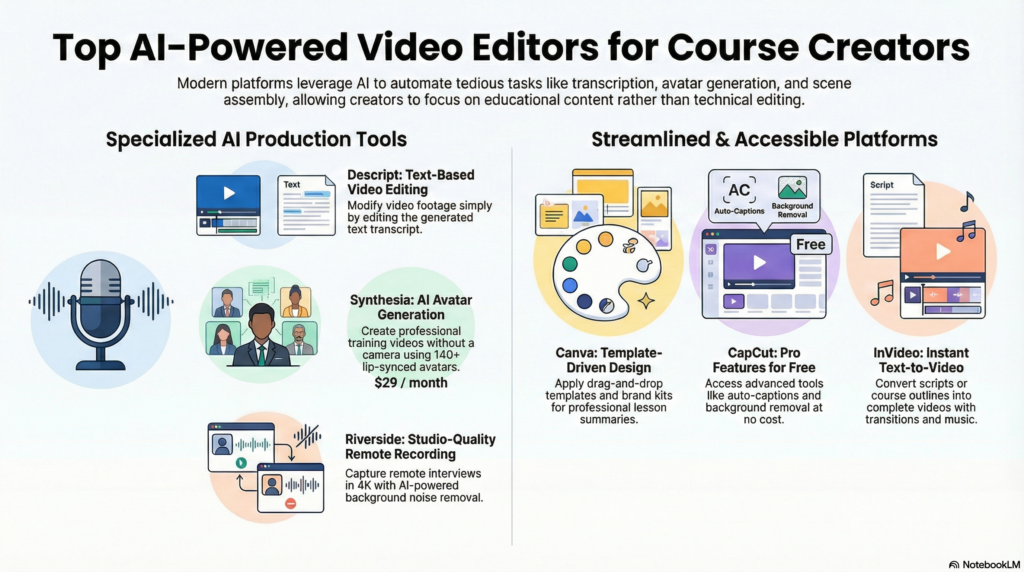
Synthesia uses AI avatars to produce text-to-video content. In the platform, creators type their script in the order which they want their video footage to appear. They can select from 140+ avatars. And the system then produces a professional quality video with lip-syncing of the audio we produce.
An impressive number of over 120 languages is supported by this software where you can also customize colours, backgrounds, and brand elements. Users may add slides, images, and screen recordings along with the AI presenter.
Training and educational content templates align the overall course structure and format. When the scripts change, Synthesia automatically refreshes the videos in the browser. The pricing structure is subscription-based, and the number of video credits is plan-dependent.
Prices Basic Free | Starter $29 | Creator $89
Descript
Functioning like a video editor, Descript lets creators alter original video footage by changing text transcripts. Software transcribes the uploaded video, and links each word to the video frame. Eliminating words from the transcript deletes those sections from the video.
AI capabilities consist of Filler word removal, removing the “ums” and “ahs” with a click. Studio Sound employs artificial intelligence to diminish background noise and enhance voice clarity.
Overdub makes a synthetic voice model that replaces mistakes without re-recording. By recording your screen, you can capture software demonstrations or presentations directly in the software.
You can add B-roll, text overlays and music, as multi-track editing supports separate video and audio tracks. Collaboration features allow team members to comment on specific moments. The software runs on desktop platforms with cloud backup of project files.
Prices Hobbyis $24 | Creator is $35 | Business is $65 per month
CapCut
CapCut is a free video editing service that has the same features as paid versions. The mobile and desktop versions offer different features, with the desktop app containing tools for advanced course production.
Features powered by AI are, auto captions in various languages, remove background without green screen and text-to-speech. The timeline editor has unlimited tracks for layering video clips, graphics and audio.
To keep your audience interested, transitions, animations and effects can help. The software comes with music and sound effects royalty free library.
By providing preset templates for the production of common video formats such as intros, outros, and chapter dividers, the process is made faster and easier. Export options allow resolution up to 4K, social sharing, or download as video files.
Prices Free | Standard $9.99 | Pro $19.99 per month
Canva Video Editor
Canva Video Editor takes all the tools of Canva and makes video production easy and accessible. The mechanics of the drag-and-drop system of utilizing the platform is similar to a graphic designer of Canva.
Templates for online courses include writing layouts for lesson introductions, explanations and module summaries. Our Asset Library is home to over millions of stock video, image, audio, and graphics that integrate right into your project.
A COMPLETE STEP-BY-STEP CHEATSHEET
TO CREATING, LAUNCHING & GROWING A SUCCESSFUL MEMBERSHIP WEBSITE

Brand kits ensure consistency in colors, fonts, and logos throughout course materials. Animated elements showcase entrances and exits while adding liveliness to a scene.
Text animations ensure that key concepts and learning outcomes stand out. The timeline helps you cut, trim, and arrange clips easily. Using cloud storage, we can sync projects across machines to edit from anywhere. Canva has free and paid subscription tiers that offer premium products and features.
Prices Free | Individual $120 | Business $200 paid yearly
Riverside
For studio-quality results, Riverside records and edits remote video content. Each participant will be recorded locally on their device at 4k resolution, which is then uploaded to the cloud.
The AI transcription helps you in detecting the speaker and makes it possible for you to locate and edit. Magic Clips selects notable moments and makes short clips from longer clips.
Tools for audio deepening level out and eliminate background noise across speakers. Split-track recording ensures every participant is isolated on different tracks for potential later edits.
This tool will help out with interviews, panels and co-teaching. The platform enables hybrid delivery via live streaming and recording. Media Board allows you to share one or more screens.
Prices Pro $29 | Live $39 | Webinar $99 per month
InVideo
InVideo is a fast video creation software that uses AI and templates. The AI video generator creates complete videos by transforming text prompts or scripts into images, video footage, transitions, and music.
Instead of editing manually, users refine the output through text commands. Formats for educational content, tutorials and other material to be used for training.
Every template includes editable logo and text placeholders for branding. Our media library allows you to select from a collection of millions of video clips, images, and audio tracks from multiple providers.

The timeline editor helps to easily customize AI-generated videos or start from scratch. Users may record voiceovers in the browser and select automated voice options across different languages, and accents.
Text-to-video features turn an article or a course outline into a video presentation. Above all, collaboration tools allow teams to have commenting and approval processes within their workflow. It works on an online platform and subscription levels according to quality exported and feature access.
Prices Plus $35 | Max $60 | Generative $120
Final Thoughts
Choosing video editing software depends on your requirements and proficiency. For some, it may be a combination of tools that perfectly match your specific needs. In our workflow, one of our experts uses Descript to initiate the recording and audio edit of the video, but then moves the project over to Premiere to finish the project.
The production of videos should be assisted by tools that improve your workflow. It should also be a tool that allows for professional-quality material.
Key factors to evaluate include:
- Budget constraints and subscription models
- Learning curve and available support resources
- Export options and file format compatibility
- Integration with existing systems and platforms
If you settle on a workflow that uses software equipped with templates and batch processing, numerous training modules or course content can be produced in less time.
When shopping for your solution, remember most vendors provide trials where the buyers can test their features and interface design. Try before you buy.
Invest in the right tools and training to improve the quality of your videos and get faster production time.


