

The online course industry continues to expand in 2026, with platforms offering increasingly sophisticated tools for course creators and educators. Selecting the right online course platform directly impacts how effectively creators can build, market, and sell their courses while shaping the overall learning experience for students.
The variety of available platforms means course creators face important decisions about features, pricing, and business models.
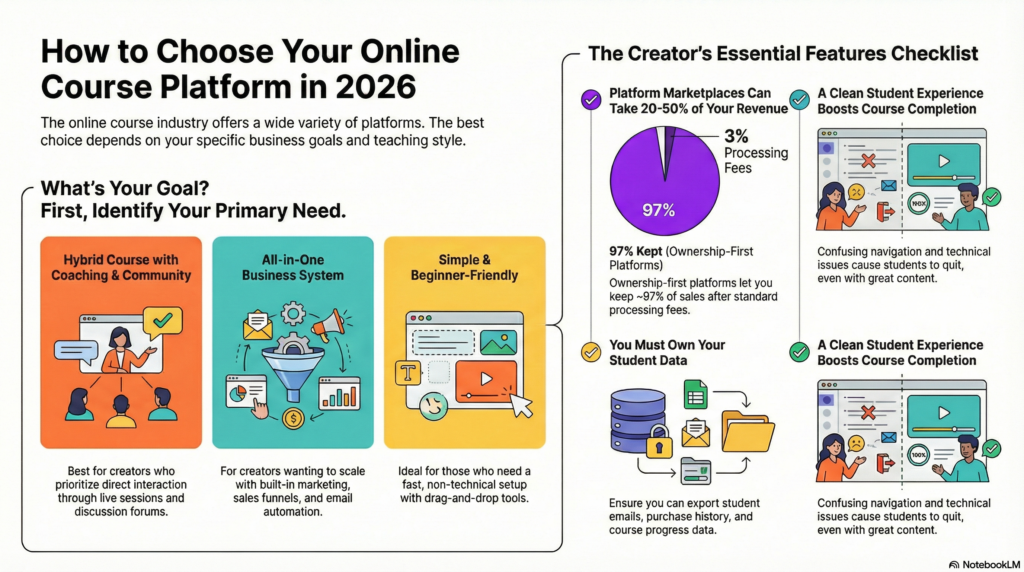
Different platforms serve different needs, from individual instructors launching their first course to established businesses scaling their online education offerings. Some platforms provide all-in-one solutions with built-in marketing and payment processing, while others focus on course delivery and learning management. Understanding these distinctions helps creators align their platform choice with their specific goals.
How To Choose The Best Platform For Your Course In 2026
The right platform depends on whether course creators prioritize community features, need comprehensive business tools, or want a straightforward setup without technical complexity.
If You Want A Hybrid Course With Coaching And Community
Platforms that combine course content with coaching features and community spaces work best for creators who build learning experiences around direct interaction. These systems typically include video hosting, discussion forums, and scheduling tools in one interface.
Key features to look for:
- Built-in community forums or membership areas
- Live session scheduling and video conferencing integration
- Direct messaging between instructors and students
- Progress tracking that connects to coaching milestones
Platforms like Kajabi and Mighty Networks offer these capabilities without requiring multiple software subscriptions. The course content sits alongside community discussions, which helps students stay engaged beyond watching videos.
Creators who run cohort-based courses or group coaching programs benefit from platforms that display both scheduled events and self-paced material. The platform should allow students to access course material, join live calls, and participate in discussions from the same dashboard.
If You Want An All-In-One Business System
Some platforms handle course hosting, email marketing, payment processing, and customer management through a single login. These systems eliminate the need to connect separate tools for different business functions.
Core business functions typically included:
- Email automation and marketing campaigns
- Sales funnels and checkout pages
- Affiliate program management
- Analytics and revenue tracking
- Student relationship management
Platforms like Thinkific Plus and Teachable’s business plans provide these integrated features. Course creators can send promotional emails, process payments, and deliver course content without switching between applications.
The trade-off involves cost and complexity. All-in-one platforms charge higher monthly fees but reduce the total spent on separate marketing and sales tools. Creators running multiple courses or planning to scale their course business find value in unified systems that track student data across products.
If You Want Something Simple And Beginner-Friendly
Platforms targeting beginner course designers focus on quick set-up not complicated features. People can upload videos, develop a basic lesson and start selling courses within hours instead of days using these options.
Simplified platforms typically offer:
- Drag-and-drop course builders
- Pre-designed templates for course pages
- Basic payment integration with Stripe or PayPal
- Minimal required settings and configurations
Podia and Thinkific’s starter plans include this help. The interface will walk the user through the steps of course creation without the need to make complex settings decisions. It’s very easy to create a course with our platform. Writers require no technical knowledge to add videos, write descriptions, set pricing, and much more.
To keep it simple, we limit customization options. While you won’t be able to change the layout of your page in any meaningful way or add in any custom code, you can launch a fully functioning course. You probably won’t need a developer to do this, nor will you need to watch lengthy tutorials.
Key Features You Need In A Course Platform
The core functions of a course platform might hinder or help a creator in their business. A suitable mix of proper ownership, features, flexibility in design, and good experience of the users separates the platforms which scale from the ones which act as a barrier.
Maximum Ownership
The creator has complete ownership over the content, student data, and business relationships, without interference from the platform. There are a few platforms that describe themselves as marketplaces as they own the student relationship and take away a significant portion of your revenue. Platforms enabling creators to turbocharge their branding, communicate with the students, and take business decisions independently.
Marketplaces owned by the platform charge between 20 to 50% of course revenue. Self-hosted or dedicated platforms allow the creator to keep 100% of sales, minus the payment processing fees (generally between 2.9% and 3.5%).
The difference has long-term business viability. A creator who sells $10,000 a month in courses keeps anywhere from $5,000 to $8,000 on marketplaces. However, on ownership-first platforms he retains $9,650. Over the course of a year, this equals $19,800 and $115,800.
All-In-One Features
By encapsulating course hosting, payment processing, email marketing and student management into a single platform you save on software costs. Using separate tools can lead to integration challenges and increased monthly expenses.
Essential all-in-one components include:
- Course hosting with unlimited video storage and bandwidth
- Payment processing supporting multiple currencies and payment plans
- Email marketing with automation sequences and broadcast capabilities
- Student management including enrollments, progress tracking, and certificates
- Community features like discussion forums or member spaces
- Analytics and reporting for sales, engagement, and completion rates
Platforms without these features make creators link other services through zapier or other similar features. These integrations often malfunction, necessitating tech fixes, and cost an extra $50-$200 a month in software.
Flexibility Of Design
The flexibility of design decides whether a course platform will allow you to customize your brand or impose templates on every creator. Custom branding aids acknowledgment and differentiates courses in competitive market.
You can upload logos and change colors with basic customization. Advanced flexibility provides custom CSS and page builder along with complete theme control The ideal platforms offer drag-and-drop editors that need no coding knowledge yet have developer access for users who want it.
Mobile responsiveness is essential in 2026 with nearly 60% of online courses being accessed via mobile. Platforms should change layouts, video players, and navigation to fit smaller screens automatically, not with different mobile versions.
Overall Functionality
Core functionality refers to how reliably lessons reach students. Slow loading times, video buffering, payment fails and other technical performance issues affect completion rates and refund requests.
To account for the variances in internet speeds, video delivery should be adaptive. Course navigation should proceed logically with a completion indicator and locked content. The drip content scheduling enables the creators to deliver the lessons after a specific date.
A COMPLETE STEP-BY-STEP CHEATSHEET
TO CREATING, LAUNCHING & GROWING A SUCCESSFUL MEMBERSHIP WEBSITE

Assessment tools are significant for courses that require verifying knowledge. A quiz builder should have multiple question types, randomisation, time limits, and passing score. When students complete a course, certificate generation adds value.
Data Ownership
The most valuable asset of any course business is student data. When data cannot be accessed, released or ported, switching will be difficult or impossible.
Creators need exportable data including:
- Student email addresses and profile information
- Purchase history and payment records
- Course progress and completion data
- Quiz results and assessment scores
- Community participation metrics
Certain services, in their terms and conditions policy, claim ownership of data or limit site exports to a few formats.
With the CSV export option for all data types, it is easy to switch platforms, analyze data in external tools or respond to a SAR.
Platforms must comply with the GDPR and similar ethical privacy frameworks to delete students information upon their request. Course creators risk legal troubles from platforms lacking this functionality.
Student Experience
In many cases, the student-facing interface has a greater impact on completion rates than content. When the navigation is confusing, technical issues are present or the website is cluttered students leave the course despite good content.
Clean interfaces put the content in front of navigation. Students should be able to access the course dashboard, current lesson and progress indicators in two clicks from any page. It is example of usability evaluation on a video player and also personal reflection.

You may use synonyms. Visual indicators that show the % completion and the lessons remaining as well as the time to finish help the students plan their learning. Through longer courses, reminder emails for students who are inactive and celebration emails for completion milestones help to keep the momentum going.
Usability
The speed with which creators launch and run courses is influenced by usability. Companies postpone their product launches owing to the steep learning curves.
The process of uploading courses should enable batch operations as opposed to uploading a file for each lesson. Reorganizing sections or reordering content can be done through drag-and-drop curriculum builders by creating sections without any technical knowledge. Use one-click duplication to quickly create similar courses or multiple versions.
Administrative tasks such as issuing refunds, manual student enrollment, or resetting students’ progress require simple interfaces. Platforms that require support tickets for everything slow down creator-led tickets and customer service responses.
Prices
As a course business matures, pricing models establish both the initial and ongoing expenses. Successful courses get hit with expensive transaction fees, while flat monthly rates benefit high-volume creators.
Common pricing structures include:
| Model | Cost Range | Best For |
|---|---|---|
| Transaction fees | 5-10% per sale | New creators testing demand |
| Monthly subscription | $39-$299/month | Established businesses with consistent sales |
| Annual plans | $390-$2,990/year | Committed creators wanting savings |
| One-time payment | $500-$3,000 | Lifetime access seekers |
Initially, the transaction fees seem attractive but they end up costing more when monthly revenue exceeds anywhere between $400-$600. A 5% charge on a monthly sale of $10,000 means $500 from your pocket. This is while most feature-rich platforms charge $149-$299 per month but won’t charge you a transaction fee.
Hidden prices are equally important as visible prices. Certain platforms charge extra fees to remove branding, access priority support, use advanced features, or exceed student limits.
Support
The quality of technical support impacts how quickly creators can fix problems preventing sales or annoying students. When launching or during peak traffic, serious platform issues need instant help, not 48-hour email.
The support channel should incorporate a live chat during the business hours, an email support via same day response and a comprehensive documentation. Creators can resolve issues without waiting for the support team thanks to video tutorials, knowledge bases, and forums.
The onboarding assistance helps creators to onboard faster. Some platforms included in their premium plans migration services and/or setup calls or course strategy calls. Creators most value these services to switch 1:0.


