

Best Online Community Platform 2026: Complete Guide to WordPress Community Plugins and Membership Solutions
To create a successful online community in 2026, you need to choose the right platform. WordPress is still one of the most versatile options.
With so many membership plugins and community solutions available, site owners are faced with the challenge of choosing tools that will really meet the needs of their community. Seamless user experiences are essential for sustained engagement.
Communities have varied needs and require different solutions, ranging from simple memberships through to complex platforms with discussion forums, content libraries and learning management systems. The best WordPress online community platform for you depends on member engagement, course delivery features, scalability, and ease of set up.
This article explores what makes an effective community platform and essential features to check out. It also looks at the top community plugins for WordPress and platforms like Mighty Networks for 2026.
What Is A Community Platform?
A platform for community is a forum for a community of similar individuals where they can interact with each other. The technology that makes it possible for communities to converse, manage memberships and engage with each other.
When you start on a community platform, you should look for features like discussion forums, member profiles, private messaging, and content sharing. Some platforms also offer scheduling events, hosting courses, payment collection via membership and more for the users.
Key features of community platforms include:
- Member registration and profile management
- Discussion boards or forums
- Content creation and sharing tools
- Notification systems for member activity
- Moderation and administration controls
- Integration options with other tools
Organizations employ community platforms to engage audiences around topics or brands, be it customers, students, fans, or professionals. A business could employ one to offer customer assistance and collect feedback.
academic institutions can create spaces for student engagement and learning The choice of platform depends on the need of community.
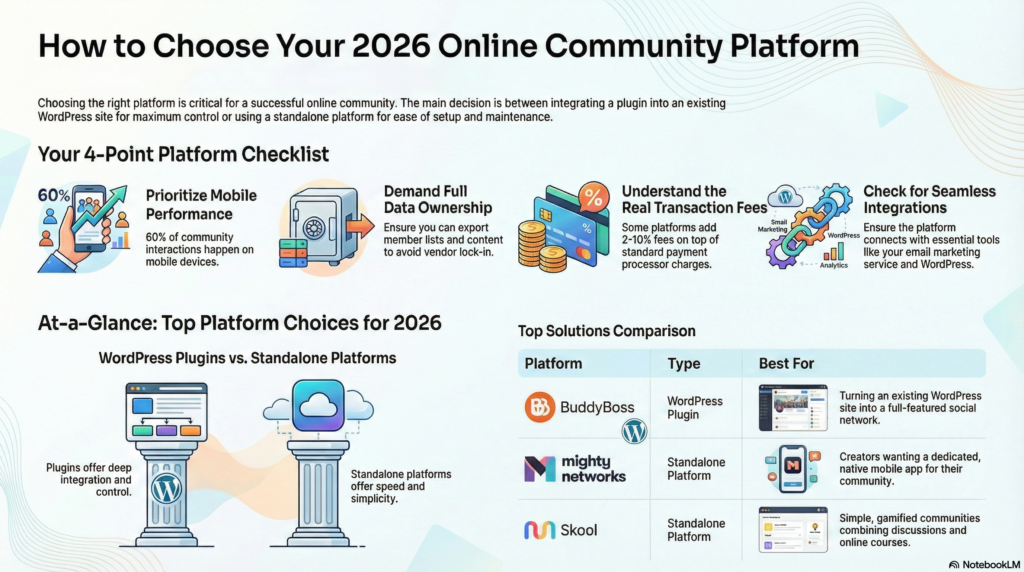
Some platforms are standalone services that include hosting. Some act as plugins or extensions on existing websites, notably WordPress sites.
Plugins for the WordPress community are important for people wanting control of their hosting or design. Platforms such as Mighty Networks allow for a less technical approach and a quicker set-up.
Each method has a separate advantage in terms of customization, usability, ease of use, feature set, etc.
Key Things To Look For From An Online Community Platforms
To choose the right platform, you must go for the platform which has proper features and full features ownership, trustworthy uptime, seamless integrations and transparent pricing. The presence of these elements can make or break a community regarding technical constraints and additional costs.
Key Features
The most basic functionality of a platform should include user profiles, forums, and messaging. Within the community space, these tools enable members to connect, share ideas and build networks.
The arrangement of content is important. Categories, tags, and search capabilities need to be accessible on the platform so that members can quickly find their discussions or resources of interest.
Community health is protected through moderation tools. The administrator will set posting permission, review flagged content and track member behaviour.
Spam filters and more help save time as well as uphold quality standards. Analytics give the employees understanding into engagement patterns.
You should monitor your active members, top topics, frequency of posting and growth trends on the dashboard of the platform. Community managers can make more informed content strategy and member needs decisions based on this data.
Ownership
Control over community data and content determined by platform ownership. Some platforms co-own any community-generated content, while others give full ownership to the community creator.
Portability of data is crucial. Community managers need to have the ability to export member lists, content archives, and engagement data at any time.
A COMPLETE STEP-BY-STEP CHEATSHEET
TO CREATING, LAUNCHING & GROWING A SUCCESSFUL MEMBERSHIP WEBSITE

This allows users to avoid vendor lock-in and keep the community’s wealth of knowledge built up over years. Custom domains help in building brand identity.
Visitors to the community website use branded URLs that are not a subdomain of the platform provider People will perceive you as more professional.
Reliable Performance
Percentage uptime shows how stable a platform is. Most platforms that are popular in the sector will ensure that they are functioning 99.9% of the time i.e. it will not be down for more than nine hours a year.
Ceaseless service interruptions hinder members’ actions and hurt the community. Speed has an influence on member retention.
The platform should load content within three seconds on standard connections. Users get frustrated and bounce when pages are slow and take time to load.
In 2026, the mobile responsiveness of a website is not an optional consideration. 60% of community interactions occur via mobile.
The platform must adjust layouts, images, a and navigations on smaller screens without losing functionality. The platform will expand alongside the community.
A platform that works well for 100 members should work equally well for 10,000 members. The server capacity, database efficiency and content delivery nets form a scalable infrastructure.
Plays Well With Others
You can add functions to the platform. It is essential for email marketing services, payment processors, and analytics tools to connect by use of native integrations or APIs.
Data entry between the applications is eliminated, as is the data entry burden on the administration staff. WordPress compatibility offers unique benefits.

With over 40% of websites using WordPress, solutions that connect with WordPress allow community managers to synchronize their content management. Members get access to community features such as blogs, courses, and more.
Simplified member experience using single sign-on. Authentication once, access all connected services without repeated logins.
This feature improves engagement and reduces friction across integrations. Webhook support helps create custom workflows.
To instigate automated actions by development teams according to community events such as new member sign-ups and publication of posts. Community needs will be met in ways beyond standard features.
Zero Additional Transaction Fees
Transaction fees have a strong influence on the economics of the community. Several platforms charge between 2 to 10 percent on every payment for the memberships, courses or digital products.
Fees reduce revenue, complicate pricing strategies, and value. The fees from the payment processor are separate considerations.
Stripe and PayPal usually take a cut of 2.9% plus $0.30 for each transaction. No matter what platform you choose, the fees will be the same. A truly transparent platform will make it clear which fees are for payments processing (i.e. charges from external payment processors) and which are for the platform itself.
Subscription-based pricing models offer predictability. Community managers are able to accurately calculate platform costs using flat monthly or annual fees.
Using this method to budget is far better than percentage-based fees sensitive to income. Certain platforms adopt a hybrid model, charging subscription fees and a percentage of transactions.
Community managers should analyze total costs in varying scenarios to confirm the true price of each platform option.
Here Are The Leading Community Solutions For 2026
The platforms have separated offerings with regards to member management, content delivery and engagement tools. There are so many learning tools available that were build for different purposes. Some are integrated with WordPress similar to the plugins we mentioned above. Others are more standalone platforms built specifically for course creators, community builders, etc.
WP-Tonic
WP-Tonic’s WordPress solution combines learning management with a community for your site. The platform integrates with your WordPress site and does not require outside hosting or login.
The platform provides membership tiers, delivery tools for lessons, along with a forum all in one place. Website owners are in complete control of their data and can customize their site using WordPress themes and plugins.
Key Features:
- Native WordPress integration
- Combined LMS and community tools
- Flexible membership structures
- Full data ownership
WP-Tonic works well for organizations already using WordPress who want to avoid platform migrations. The learning curve remains minimal for users familiar with WordPress administration.
Circle
The circle is a stand-alone platform for hosting courses and community engagement. The interface emphasizes threading conversations, real-time events, and member directories instead of forums.
Members have access to dedicated spaces for different topics, each containing posts events and resources. It has built-in tools for payment processing, email notifications, and member analytics.
Membership fees for Circle depend on how many members account you have. This pricing model is ideal for growing communities, but at scale, it’s costly.
Core Capabilities:
- Space-based organization
- Built-in payment processing
- Live event hosting
- Member analytics dashboard
MemberMouse
MemberMouse functions as a WordPress membership plugin specializing in content protection and payment management. The plugin focuses on subscription handling rather than community interaction features.
It supports multiple membership levels, drip content schedules, and integration with major payment processors. Site owners can protect any WordPress content type, including posts, pages, and custom post types.
MemberMouse requires separate community plugins for forums or social features. The plugin excels at managing complex membership structures with varied access rules and pricing options.
Mighty Networks
Mighty Networks is a mobile-first community platform that has course built in. The service focuses on native mobile apps that members can download from the app store.
Each of the networks has discussion feeds, member profiles, courses, and event scheduling. The platform automatically creates applications for both iOS and Android.
Pricing begins with a basic package for simple communities and scales all the way up to enterprise options with white-label apps. Mighty Networks takes a cut on the community’s offerings at lower priced subscription tiers.
Platform Highlights:
- Native mobile applications
- Integrated course builder
- Event management tools
- White-label options available
BuddyBoss
BuddyBoss converts WordPress sites into social networks, featuring extensive community features. It comes with a theme and plugin to build member profiles, activity feeds, private messaging, and more.
With LearnDash integration, you can offer courses and incorporate custom member types, group, and forum support. BuddyBoss offers mobile apps as an add-on service for communities needing native apps.
Integration Options:
- LearnDash LMS compatibility
- bbPress forum support
- WooCommerce integration
- Zoom meeting connectivity
A WordPress is necessary for BuddyBoss hosting along with some knowledge of technology. One time license fee includes updates however mobile apps are charged annually separately.
Skool
Skool is a social media platform that combines discussions and lessons. The platform offers a game-like experience which allows members to earn points and unlock achievements via participation.
A main feed that acts as a social ‘water cooler’, a classroom section for courses, and a calendar for events. The simplified layout eliminates a number of customisation options, ensuring a consistent user experience throughout all Skool communities.
Skool charges per community a flat monthly price and not by members. The website hosting, updates and technical support are all handled by us.
Frequently Asked Questions
What are the best online community platforms for WordPress for 2026, and how do I choose the right online community?
When selecting the best online community, you’ll want to evaluate the features and integrations you want, as well as whether you want a dedicated community platform on the market or to extend your existing WordPress site with a WordPress community plug-in. Some of the best online community platforms in 2026 include full-service SaaS options and powerful WordPress plugins (membership plugin for WordPress sites, free WordPress plugin options such as BuddyPress) . Look for some community features at this level, social proof, and proof of the exclusive community setting. Look for strong community management tools. Seek membership plugin seamless integration with WordPress. Look for monetization options for your community and/or community-course platform capabilities.
Can I build a community on WordPress for free and which free WordPress community plugin should I consider?
Certainly! You can use free WordPress plugins to create a community on WordPress for free! BuddyPress is a free WordPress plugin that lets you add social network or community features to your site. There is a selection of other community and forum plugins which will cost nothing for an infinite amount of time. You can create a community, add groups, profiles and messaging without having to pay for anything. Be aware that a free community may require paid add-ons to scale, integrate course platform capabilities, or provide a premium community experience to engaged community members.
How do I create a private community for my members and transform my WordPress site into a membership-driven community?
To create a private community for your members, you can use a membership plugin for WordPress along with a community plugin or a full community platform integration. The top membership plugins for WordPress allow you to restrict content, build levels and an exclusive community, as well as integrate payments to monetize your community. Make use of the WordPress dashboard to control access, register community members in online course content and create an online community around your membership or create an online community with a membership that offers member-only discussions, events and resources.
What features should I look for to build a thriving online community around my course or membership site?
To build your community around your own membership or online course you can use different features. With proper functionality, you can create a community that gives a much better experience. Look for features like threaded discussions, private groups, messaging, course platform integrations, gamification and moderation for community management. Consider analytics, single sign-on with your membership plugin for WordPress.t site, and options like add community within your community like sub-groups for cohorts, too. These features help form a vibrant online community and keep community members engaged.
How can I grow and monetize my community while maintaining an engaged community experience?
Grow your community through value – exclusive content, live events, courses, and encouraging your community to refer others. Implement the most efficient WordPress membership or community plugins to set up tiers and a monetizable exclusive community experience. Monetize with paid memberships, paid online course access, premium groups or paid events. Regularly manage your community. Build a feedback loop in your community. Use the WordPress dashboard and plugins to measure community growth and retention. This allows you to scale a community without over-moderation.
Is it better to use a standalone community platform or WordPress plugins for building and managing online communities?
There are standalone community platforms that you can quickly set up and that have hosted reliability, plus benefits such as built-in social features. Alternatively, using WordPress community plugins, you can turn your WordPress site into a customer community, which deeply integrates into your WordPress content and course platform. If you have a WordPress site but want to create a community around your membership or courses, WordPress plugins (some free community plugins or best WordPress membership plugins) give you flexibility. needing less technical maintenance or advanced features out of the box? Look for the best online community platforms available that are integrated into WordPress. The optimal selection is contingent upon the nature of your community, the limitations of your budget, and the long-term goals you have set for your online community.
Final Thoughts
Determining the right online community platform in 2026 requires understanding specific needs and goals.
When you are set up for self-hosted, community plugins can give you more flexibility and control in your blog setup.
Mighty Networks is a complete solution taking care of the tech for you.
The decision between platforms depends on several factors:
- Technical expertise available within the organization
- Budget for both setup and ongoing maintenance
- Customization requirements for branding and features
- Scalability needs as the community grows
WordPress membership plugins perform best for communities already using WordPress sites.
You can easily customize them with well over thousands of plugins, which are on offer.
The specification platform Mighty Networks appears to be ideal to use for creators who are best off focusing on engagement instead of tech management.
The services combine hosting, mobile apps, and support with predictable monthly costs.
The involvement of the community is high when the platform suits the community.
Some members prefer to use a browser to connect while others tend to use the app more.
A feature testing platform or application helps determine whether something works as intended.
To begin using WordPress you will need to commit more time to get going, but this gives you far greater control.
Managed community platforms lower technical burdens but offer limited customization.


