


WordPress LMS Solutions: How to Create and Sell Online Courses with Learning Management Systems
One of the best platforms for creating and selling online courses is WordPress. By being flexible and offering plug-ins for specific course-building learning management systems, WordPress has enabled teachers and entrepreneurs to build a complete online course platform without technical skills.
The integration of lifterLMS and WooCommerce is a popular choice for course delivery and payment processing.
Simply uploading a course to a learning management system won’t make your online course business successful. Educational designers should use tactical marketing tactics, sales funnels, WordPress tools, and more to attract students and effectively monetize their course content.
Start With A High-Value Lead Magnet
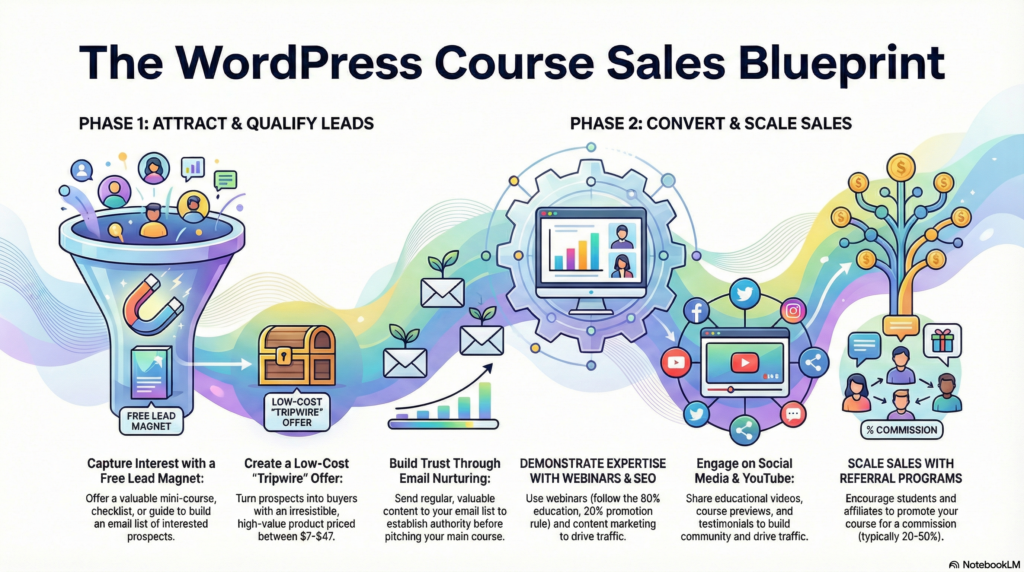
A lead magnet is fundamental to building an email list of potential buyers of your course. It draws people who are actually interested in the topic.
Lead magnets should deliver value right away while showcasing authority of the creator. Mini-courses which are free will work well for course creators to demonstrate.
Checklists, templates, and resource guides are also popular when they solve a specific problem. The lead magnet is supposed to link to the main course.
The photographer selling a photography course can give a free lighting guide or cheat sheet for camera settings. WordPress simplifies lead magnet delivery via numerous plugins.
Creators can use:
- Email marketing plugins like FluentCRM or MailMint integrations
- Pop-up plugins to display opt-in forms
- Download delivery plugins for automatic file distribution
It should be easy to opt in. Multi-step forms hurt conversion rates.
In most cases, a name and an email address are all anyone needs. Landing pages designed specifically for lead magnets typically outperform sidebar widgets more effectively.
These focused pages eliminate noise and drive home the value proposition. Trying out a variety of lead magnet formats helps figure out what your audience likes.
Some groups of people prefer to watch videos and others prefer to read. Analytics tools can track which formats generate the most qualified leads who buy courses.
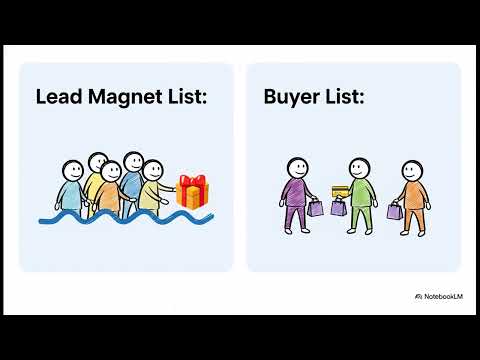
Tripwire Or Low-Ticket Offer (Builds A Buyer List)
A tripwire offer is a cheap digital product that turns customers into buyers. WordPress course creators often use these offers to build buyer lists and to build purchasing relationships with their audience.
Most prospects can afford common tripwire prices, which range from $7-$47. Typically substantial offers that are worth their price that could lead to a fast purchase.
Course creators can implement tripwire offers through several WordPress methods:
- WooCommerce integration for payment processing
- LifterLMS for course delivery
- Email marketing plugins for follow-up sequences
- Landing page builders for conversion optimization
Buyers have shown intent to purchase on tripwire. A person who buys a mini-course at $19 is more likely to buy a $297 program later on.
Offers with problems that can be solved quickly. A WordPress tutorial creator might sell a “Site Speed Optimization Checklist” for $9 before promoting their complete performance course for $199.
The psychology of a buyer list differs from a lead magnet. People consume free content while serious buyers consume content that attract them to pay.
WordPress sites can use FluentCRM or WPFunnels to automate a tripwire sequence. These tools follow customer behavior and make relevant offers at the right time.
Typically, 10-25% of tripwire buyers convert into high-ticket buyers of courses. Course creators should create tripwires that flow into the offer and stand on their own.
Build And Nurture Your Email List
On WordPress, email marketing is still among the best ways to promote your online courses. By placing opt-in forms throughout the website it helps course creators to collect leads.
Lead magnets are incredibly effective at creating email lists for courses. Offers, such as free mini-courses, worksheets, or exclusive video content, that visitors receive for entering their email.
Professional opt-in forms can be created by the use of WordPress plugins like FluentCRM. You can use these tools with email marketing platforms like Omnisend. ConvertKit, or ActiveCampaign.
| Email List Building Strategy | Implementation Method |
|---|---|
| Exit-intent popups | Plugin-based forms |
| Content upgrades | Downloadable resources |
| Course previews | Gated video content |
| Newsletter signup | Footer and sidebar forms |
Course creators must categorise their email subscribers based on interests and engagement levels. It allows you to communicate specific messages about individual courses or topics to different audience segments.
To keep your subscribers engaged in between course launches, send them regular nurturing emails. Expert industry recommendations and behind-the-scenes insights, as well as student success stories build trust and authority.
You could run automated email sequences to welcome new subscribers about who a creator is. These sequences usually end in a gentle pitch for the creator’s flagship course or coaching program.
YouTube Marketing
Through YouTube, course creators using WordPress can reach their potential students and more. Content creators should upload educational videos, tutorial videos, and course preview videos to engage audience.
Instructors can create free content to showcase their expertise and drive traffic to their WordPress LMS with the platform. Video content fosters trust and provides insight into teaching style before students buy a course.
Content creators need to create a consistent uploading schedule to keep the audience engaged. Consistently posting content helps you to build loyalty from subscribers and rank higher on search results based on the algorithms developed by Youtube itself.
Effective YouTube marketing strategies include:
- Creating course trailer videos
- Publishing weekly educational content
- Responding to comments promptly
- Using relevant keywords in titles and descriptions
- Adding custom thumbnails for better click rates
Channel optimization means making compelling channel art, writing detailed about sections and putting content into playlists. Knowing the instructor’s credentials and that of the course (i.e., the institution, grouping).
The analytics of YouTube supply important information that gives insight into who is watching your videos and how more engaged audiences are. This data helps course makers to understand their audience and improve their marketing strategy.
YouTube can integrate with your WordPress site through embedded videos or direct links to the course page. Creators can incorporate call-to-action elements in their videos directing traffic to their WordPress learning management system.
With monetization options for creators, the platform enables course developers to earn via ads. Yet, the main goal is to get qualified traffic on WordPress host courses where higher profit margins exist.
Master Webinar Marketing
Webinars are excellent for promoting online courses hosted on WordPress sites. They link course creators with interested students, and show off expertise in real-time.
Organizing webinars must be done by timing and topic. The content of the webinar should be aligned with the course.
The webinar gives a preview of the teaching style and value of the course. Users of WordPress can make use of webinar software with their LMS setup.
Popular platforms include:
| Platform | WordPress Integration | Key Features |
|---|---|---|
| Zoom | Plugin available | Screen sharing, recording |
| GoToWebinar | WooCommerce compatible | Registration management |
| WebinarJam | Direct integration | Automated sequences |
Registration forms must connect directly to the WordPress database. As a result, capture leads without effort so that they’ll flow into email marketing systems.
Webinars are primarily to provide value and not to sell. 80 percent education, 20 percent promotion. The 80/20 rule.
This balance makes the participants feel more comfortable with the full course offer. I extended the marketing life of webinars.
Creators of WordPress courses can turn their recordings into lead magnets or bonuses. The recorded sessions are compatible with LearnDash and other LMS plugins.
Follow-up sequences are critical to convert. Using automated emails with WordPress can help you reach webinar attendees.
Harness The Power Of Content Marketing & SEO
The course creators of WordPress can use content marketing and SEO to gear organic traffic to their LMS. This strategy generates suitable leads with a strong interest in educational content.
Online courses prove to be a fantastic application of content marketing strategies. Those who create courses must blog about frequently asked questions asked by their audience.
Through these posts, we establish credibility and direct students to enroll. SEO optimization aids in the ranking of WordPress LMS platforms.
Key tactics include:
- Keyword research for course-related topics
- On-page optimization of course descriptions
- Technical SEO improvements for site speed
- Internal linking between blog content and courses
This is a great WooCommerce integration to optimize product pages for your course sales. All of your course pages must have proper keyword, detail & CTA.
Educational topics use long-format content effectively. Comprehensive guides built by course creators demonstrate knowledge while targeting multiple related keywords.
Plugins like LearnDash LMS create SEO-friendly course structures. The lessons and modules are created as individual pages, increasing the indexable content on the site.
Local SEO helps instructors who teach location-based skills. Utilizing area-specific keywords they can attract pupils within their vicinity
Repurposing content gives a boost to your marketing efforts. A single blog topic can generate social media posts, email newsletters, and more.
Engage & Sell With Social Media (Organic And Paid)
You might find it useful to reach out to potential students and make sales through social media platforms. When you create organic content, you build trust and establish expertise. When paying for ads, you target people much more finely.
Organic Social Media Strategies:
- Share valuable course previews and educational snippets
- Post student testimonials and success stories
- Create behind-the-scenes content about course development
- Engage with comments and questions from followers
Course creators must pay attention to where their audience is most likely to be present.
Professional development courses work well on LinkedIn, and creative subjects work well on TikTok and Instagram
Paid Advertising Options:
- Facebook and Instagram ads with detailed targeting
- YouTube video ads to demonstrate course value
- LinkedIn sponsored content for business courses
- Twitter promoted posts for timely topics
| Platform | Best For | Organic Reach | Paid Options |
|---|---|---|---|
| Broad audiences | Limited | Extensive | |
| Visual content | Moderate | Strong | |
| Professional | Good | Targeted | |
| YouTube | Video demos | High | Effective |
Campaigns which are successful will issue organic posting schedules and augment them with paid promotions. In order to determine what is popular and what is not, they can look at the data and then use what works best.
When you post regularly, people become familiar with your brand. Moreover, effective advertising cements your followers into students. Both methods work hand in hand to boost course sales on WordPress LMS.
Strategic Affiliate Program
When course creators become affiliates of a strategic affiliate program, they will promote course for a commission.
Plugins allow WordPress LMS platforms, such as LearnDash, to work seamlessly with affiliate tracking systems.
Course sellers can recruit affiliates from among their students, the industry, and complementary businesses.
Affiliates usually earn anywhere from 20-50% in commission ratio depending on the price point and market positioning of the course.
Course platforms using WooCommerce have built-in affiliate functionality. You can use the AffiliateWP extension for further enhancement.
They monitor referrals, manage payments, and provide comprehensive reports for course creators and their affiliate partners.
Effective affiliate recruitment focuses on three key areas:
- Content creators in related niches who already serve the target audience
- Former students who achieved notable results from the course content
- Industry professionals with established email lists or social media followings
Real statistics, promotional materials, and earnings must be visible in the affiliate dashboard.
A clear terms-of-service will reduce the occurrence of dispute, and a payment schedule will please both parties.
Course creators on WordPress benefit from automated onboarding process for affiliates.
Newly registered affiliates gain immediate access a wide range of marketing tools including tracking links, banners and email templates.
Commission structure with 8 tiers for affiliates.
Larger volume partners receive higher percentage sales, providing motivation to promote continually.
Student Referral Program
Course participants sell WordPress based education programs through a referring student program.
Encouraging existing students to refer courses to their friends and family for benefits.
Many LMS plugins like LifterLMS and Creator LMS come with built referral tracking.
The creators of a course can implement automated systems that track referrals and assign students enrollments.
Common referral rewards include:
- Commission percentages on successful sales
- Free access to additional courses
- Exclusive content or bonuses
- Account credits for future purchases
WooCommerce integration makes it easy to make payments for referral commission.
According to the schedule, the earnings will automatically be calculated by the system and paid to the referring students.
Referral programs allow others to promote your course based on trust it would be effective.
Students who promote classes tend to convert better than ads.
| Referral Method | Tracking Type | Payout Structure |
|---|---|---|
| Direct links | Automatic | Percentage-based |
| Coupon codes | Manual/Auto | Fixed amount |
| Email campaigns | Tracked URLs | Tiered rewards |
Course creators on WordPress set their original referral terms based on their unique business model.
Some pay a one-time fee while others have commissions that recur for subscriptions courses.
The referral dashboard shows you the number of clicks, conversions, and what is pending.
Students can view their specific referral link and earnings through portal pages.
Best Course Building Plugins
WordPress has several unique plugins for creating and selling online courses.
With these tools, a regular WordPress site can be switched into a complete LMS.
The most popular LMS plugins for WordPress are both lifterLMS and LearnDash.
This offers course drag-and-drop building, quiz creation and progress tracking.
The plugin is integrated with WooCommerce for payment processing.
The core plugin at LifterLMS is free, while the other premium additions are not free.
With this platform, users can create multimedia courses, build membership sites, and manage enrollments.
The plugin comes with e-commerce features.
| Plugin | Price | Key Features |
|---|---|---|
| LearnDash | $199/year | Advanced quizzing, certificates, gamification |
| LifterLMS | Free + paid add-ons | Built-in payments, memberships |
Creator LMS aims to create professional course website.
Live streaming, course reviews, instructor profiles: all included in there.
Extensions for certificates, course prerequisites, and payment gateways are premium.
This plugin is designed for users who want straightforward course delivery and minimal functionality.
Page Builders DIY User
WordPress page builders to create a learning management system without any coding skills.
WordPress-compatible Gutenberg builders integrate seamlessly, while other standalone builders offer advanced features and unique designs.
WordPress Gutenberg-Based Builders
Gutenberg-based builders significantly upgrade WordPress’s own block editor for creating courses.
These builders keep compatibility with core WordPress updates and provide a familiar editing experience.
FSE themes utilize the Gutenberg blocks directly without another layer.
The native editor lets course creators modify headers, footers and course layouts.
The themes that are most used include Twenty Twenty-Three and GeneratePress Pro.
Block libraries enhance Gutenberg’s capabilities with specific course functionalities.
Essential blocks include:
- Course grids and catalogs
- Progress bars and completion tracking
- Student dashboards
- Lesson navigation
Kadence Blocks offers several course-specific blocks inside Gutenberg.
The plugin has an astonishing typography, spacing control and responsive design.
By making use of WooCommerce blocks, course creators are able to accept payment on their course sites.
The CoBlocks will give you other Gutenberg block for educational purposes.
The plugin features accordion blocks for FAQs, highlight boxes for important concepts, and social sharing blocks for promoting courses.
KadenceWP
KadenceWP offers a lightweight theme and significant Gutenberg blocks for course creation.
The theme is fast-loading and compatible with major LMS plugins like LearnDash and LifterLMS.
Kadence Theme offers templates and layouts for courses.
Designed course archive pages, lesson layouts, and student dashboards cut down setup time.
There is a dark mode and accessibility feature in it.
You could create custom navigation to your course sites using header and footer builders.
Site headers can be equipped with login buttons, progress indicators, and a course search feature.
Sticky navigation allows easy access to study material.
Controls ensure optimal readability of courses on all devices.
Color schemes, line spacing and font pairings improved student engagement.
Allows integration of Google and Adobe Fonts for websites.
You can sell courses directly from the product page via WooCommerce integration.
Customized checkout flows and course-specific product layouts increase conversions.
Built-in cart and account page designs match course site aesthetics.
Divi 5
Visual editing features in Divi 5 especially help course creators.
The builder is independent of WordPress themes but fully compatible with any LMS plugin.
With the visual editing interface, you can customize the course page in real-time.
Lesson layouts can be modified, spacing can be adjusted, and changes can be previewed instantly.
Codeshield gives you an option to enhance your course presentation.
Course-specific modules of Add-on include testimonial carousel and pricing tables.
Course launches are made more urgent by the countdown timer module.
Lesson hosting supports Vimeo and YouTube through video modules.A consistent branding experience across all course pages.
By editing one site setting, the header, footer, and course navigation will update throughout the entire site.
When working with many courses or lesson series this will save you a lot of time.
Make sure your courses can display correctly on phones, tablets, and computers.
With Divi 5, you can customize for specific devices.
Mobile learning experiences improve when a user has touch-sensitive navigation and elements of the course is of a reasonable size.
Non Gutenberg Builders
Non Gutenberg page builders do not depend on/set WordPress block editor system.
These solutions often offer enhanced design capabilities and specialised course development elements.
Course page creation is easy for imperatiiv users via drag-and-drop user interfaces.
With visual editing, there’s no need to know code to create professional designs.
Pre-designed course layouts and elements are template libraries.
Templates for education include student onboarding sequences, lesson structures, and course completion pages.
Third-party integrations link and communicate with various email marketing platforms, payment processors, etc.
These connections create organized marketing of the courses.
Elementor
Elementor includes visual page builder course creation features.
The platform offers a variety of free and paid course creation workflows.
Elementor Pro offers sophisticated widgets for course sites.
The Posts widget allows you to display course catalogs and filter them accordingly.
The widgets for forms manage course inquiries and student registrations.
Theme Builder allows you to create custom templates.
Course creators can create unique templates for the single course page, lesson layouts, and student dashboard.
Global styling ensures brand consistency.
Popup Builder facilitates the creation of overlays to generate leads for your course.
These popups help if any potential student is leaving course pages.
Time-based popups may promote discount on courses or free trials.
WooCommerce Builder creates personalized product pages for course sales.
Improving sales conversion rates requires enhanced product galleries, custom checkout flows, and course-specific product layouts.
BreakDance
BreakDance ensures a modern design and a great performance optimization of courses.
The builder emphasises the clean output of codes and fast loading time that is essential for student retention.
Using components in our design helps reuse course elements across different pages.
Instructors can set up templates, student feedback, and navigation objects once and use them on the entire site.
Professional CSS controls provide the perfect price course pages.
Your course will standout with custom animations, hovers, and transitions.
The builder has the capability to use CSS Grid and Flexbox.
Guaranteeing that your courses load quickly on every device helps with performance optimisation.
Having a clean HTML output and optimized CSS helps in speeding the page load time.
Courses that load fast increases student engagement & completion.
Webhooks andPHP integration are available for developers.
Power users can link courses to outside platforms, design custom student dashboards, and implement special tracking functionality.
LMS Plugin
LifterLMS has the drag-and-drop course creation tool with membership integration.
Creator LMS focuses on content delivery and student management with minimum functionalities.
LifterLMS
LifterLMS gives you a Drag and drop interface to create courses easily.
Users can create multi-tier courses with lessons, quizzes and assignments without coding skills.
There are multiple options to monetize with the plugin.
Through our integration with WooCommerce, one-off course purchases work while membership tiers allow for recurrence revenue models.
Payment processing recognizes crucial credit cards and PayPal.
Student engagement features include:
- Certificates for course completion
- Achievement badges for milestones
- Discussion forums for community building
- Private messaging between instructors and students
LifterLMS monitors trends and offers reporting functions on learners’ success.
The dashboard report gives you completion rates, quiz scores, and revenue.
The site owner can define permission levels for instructors, students, and admin through user roles.
Creator LMS
Creator LMS does not have unnecessary course delivery features.
The plugin focuses on rapid loading of course content and tidy layouts for all devices.
To create course, we use Wordpress native post editor.
Teachers can upload video content, PDF materials, and any text lessons through the same interface.
Drip content scheduling refers to releasing lessons on set dates or upon prerequisite completion.
Student management is as easy as tracking progress.
It includes a dashboard where lessons completed and quizzes attempted are recorded.
The integration of payments uses Stripe for a direct transaction.
Key features include:
- Video hosting compatibility with YouTube and Vimeo
- Quiz builder with multiple question types
- Mobile-responsive course layouts
- Email notifications for course updates
Creator LMS utilizes less server resources than other feature-rich designs.
Most WordPress themes don’t require customization to work with the plugin.
Advanced Shopping Cart
The merchants selling WordPress courses rely on two different shopping cart options to set up eCommerce features on their websites.
WooCommerce has ecommerce features and extensive customization options. FluentCart offers optimized checkout solutions for digital products.
WooCommerce
With WooCommerce, you can create your eCommerce store with WordPress, with all the required features & functionalities.
This plugin works with PayPal, Stripe, Square, and multiple other gateways. This allows course makers to accept payment methods from customers all over the world.
The shopping cart system can deal with complex pricing such as subscription courses, payment plans and bulk discounts.
Sellers of courses can set tax calculations that are automatic, options for shipping of physical material and inventory of limited enrollment courses.
Key WooCommerce cart features include:
- Abandoned cart recovery emails
- Guest checkout options
- Save for later functionality
- Cross-selling and upselling tools
- Mobile-responsive checkout pages
WooCommerce can be integrated with various LMS plugins like LearnDash and LifterLMS.
This integration automatically enrolls courses upon successful payment completion.
FluentCart
FluentCart builds high-converting checkout experiences for WordPress course sellers.
The plugin minimizes cart abandonment with one-page checkout and removes any field users might not fill in.
The system allows you to effortlessly increase average order value via upsells and order bumps.
During checkout, course creators can display free gift products or premium versions of their courses without taking customers to a new page.
FluentCart comes with built-in conversion optimization features such as urgency timers, social proof notifications and mobile-first design templates.
The plugin accepts Stripe and PayPal payments without compromising loading speed performance.
FluentCart advantages for course sales:
- Distraction-free checkout pages
- A/B testing capabilities for forms
- Real-time analytics tracking
- Seamless WordPress integration
The plugin is compatible with membership sites and course platforms, which allow immediate delivery of access after purchase.
Marketing
WordPress course creators can use specialized plugins to automate email marketing and build an effective sales funnel.
These tools connect with LMS to make customer acquisition and retention easy.
FluentCRM
FluentCRM is an all-in-one email marketing solution created for WordPress sites.
This plugin will work in sync with various LMS like LearnDash and LifterLMS.
Instructors can create email sequences that can be triggered based on student actions.
Some of these are the welcome email on enrollment, reminder emails on incomplete progress, and promotion campaigns for launches.
The plugin provides advanced segmentation functions.
Users can generate targeted email lists based on course completion rate, purchases made, and engagement level.
As a result, conversion rates are increased with such messages.
Key automation features include:
- Enrollment confirmation sequences
- Course completion certificates
- Abandoned cart recovery emails
- Student re-engagement campaigns
FluentCRM does detailed analytics for each campaign.
Creators of programs can monitor the open rates, click-through rates, and conversions to improve their email marketing.
WPFunnels
WPFunnels enables course creators to build high-converting sales funnels directly within WordPress.
The plugin eliminates the need for external funnel-building software.
Users can create multi-step sales processes with dedicated landing pages, order forms, and thank-you pages.
The drag-and-drop builder includes pre-designed templates optimized for course sales.
The plugin integrates with WooCommerce and major payment processors.
This allows for seamless checkout experiences with one-click upsells and cross-sells.
Course creators can offer payment plans, bundle deals, and limited-time discounts.
Funnel components include:
- Lead capture pages
- Sales pages with video integration
- Order bumps and upsells
- Membership access pages
WPFunnels includes split-testing feature for landing pages and checkout forms.
Creators of courses are able to test various headlines, pricing, and CTAs.
Popup Builder
WordPress course sales have mastered dynamic and interactive user engagement to increase sales.
They convert browsers into enrolled students through targeted promotional messages.
Popup Builder
Course creators leverage the power of WordPress’s popup builder plugins to showcase topical course offers, announce courses and capture emails.
You may use these tools alongside popular LMS platforms, including LifterLMS and WooCommerce, to create automated marketing funnels.
Essential popup types for course sellers include:
- Exit-intent popups that activate when visitors attempt to leave
- Timed popups that appear after specific page durations
- Scroll-triggered popups that display when users reach course descriptions
- Cart abandonment popups offering discounts on incomplete purchases
Well-known plugins such as OptinMonster and Popup Maker provide drag-and-drop builders and pre-designed templates.
Without any coding experience, Users can alter colors, fonts, and message styles to their liking.
Course creators can showcase distinct popups based on their visitors’ actions, referral source, and location with advanced targeting options.
A/B testing features help optimize the conversions by contrasting popups to effectively detect the best design that can increase course enrollments.
Final Thoughts
Course creators can use WordPress in multiple ways to create and sell their courses.
The platform’s flexibility enables teachers to choose from multiple LMS plugins like Liftrerlms or connect with FluentCart for payments.
It is essential to choose the right sets of tool for a need.
Course creators should think about their technical skills, budget, and desired features before going with a setup.
Solutions for different experience levels with the WordPress ecosystem
- Beginners can start with user-friendly plugins and themes.
- Intermediate users benefit from customizable LMS options.
- Advanced developers can build completely custom solutions.
Budget allocation matters significantly.
There are free plugins which provide basic functionalities, while the premium plugins offer advanced functionality such as app widgets, certificates, detailed analytics, various membership tiers, etc.
Online Courses Based on WordPress Scale Well.
Small enterprises can start out with a small investment and have the possibility to expand functionalities according to the growth of their business.
Technical support differs from plugin to theme.
Before doing anything, course creators should explore available documentation, forum community and support service.
WordPress keeps on evolving with new features and integrations.
People who begin with this platform can always modify things as technology and student needs change.


