

LMS Creator Plugin: Complete Guide to Choosing the Best WordPress Solution
The LMS plugin you choose for WordPress will make the difference between having a successful online course business and one limited by tech. Creator LMS is a comprehensive learning management system built exclusively for WordPress.
It offers course creation, gamification, and customer support features for both individual course creators and larger training organizations. The platform competes in a crowded market with established players like Tutor LMS and other WordPress LMS plugins
I am conducting a review of the Creator LMS on many fronts. We will look at its features, topics, pricing, and multitenancy.
When trying to decide if Creator LMS is for you, it helps to know how the eLearning configuration, such as the way course creation works, as well as certificate generation, quiz configuration, and the overall LEarning Experience works.
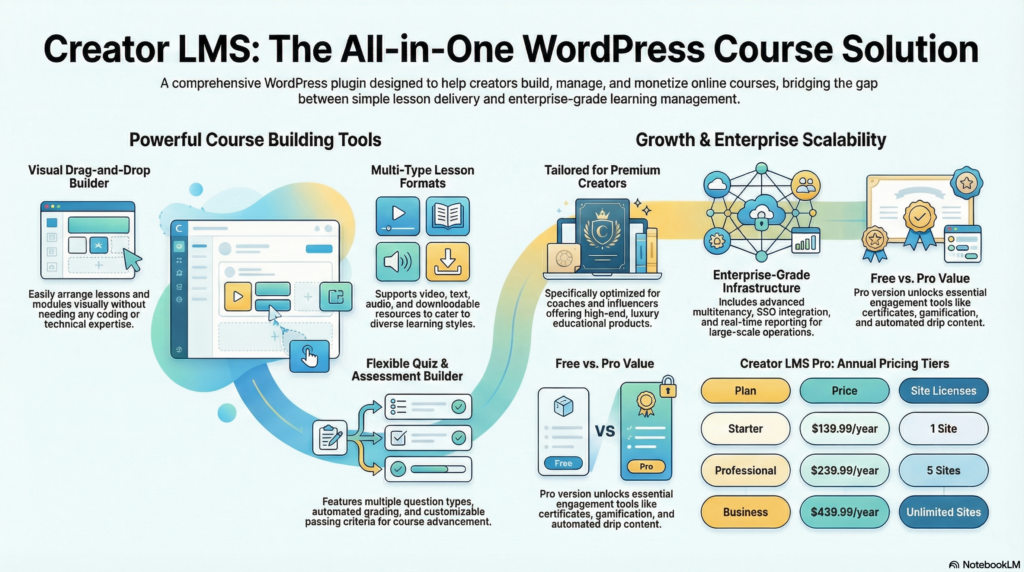
Whether you need an LMS for an individual trainer or enterprise features like SSO and constant reporting, knowing more can shine a light on your requirements. The following segments will break down the platform’s functions and limitations to help you choose the best LMS solution for you.
Creator LMS Main Features
Creator LMS offers a template-based layout system, including different lesson formats, customization quizzes, and an easy drag-and-drop interface for course builders. Course builders use these tools to easily create structured learning experiences without expert skills.
Course Layout Template
Creator LMS has ready-to-use course structure templates that define the look and feel of the online course. Course creators are able to select from a selection of template options to match their teaching style and content type.
The templates dictate how learners proceed through their courses, including their lessons, modules, and other resources. Every template has the choice of custom features such as the sidebar position, content width, and navigation menus.
The creators have the right to change template parts to suit their brand definition. The system standardizes the style of pages throughout the course so that less time is spent on design decisions.
Multi-Type Lessons
The platform offers different kinds of lessons for different kinds of materials and methods. Course creators can build lessons using.
- Video lessons with embedded players and playback controls
- Text-based content with rich formatting options
- Audio files for podcast-style instruction
- Downloadable resources like PDFs, worksheets, and files
- Embedded content from external platforms
Every lesson type has its own settings for delivery and interaction. To cater to the diverse learning styles of students, teachers can combine combinations of various formats within the same lesson. The system automatically tracks completion status for each lesson type.
Flexible Quiz Builder
Creator LMS has a quiz builder that allows you to create multiple assessments. Students can reply to true-false, MCQ, fill-in-the-gap, and essay-type queries.
Creators of quizzes can set point values to individual questions and passing criteria for course advancement. The system allows you to limit time, randomize questions and restrict attempts.
Auto-graded answers appear immediately. Results for essay responses await a professor’s evaluation. A quiz maker offers feedback settings to show correct answers and explanations after the assessment is submitted.
Drag-And-Drop Course Builder
With a drag-and-drop functionality, course builder places the lessons, modules, and other course materials. Creators can rearrange content by clicking and moving the content to a new location in the course.
The builder presents the entire hierarch of course visually to demonstrate the modules and lessons relation. The organization method doesn’t require you to code or tweak configurations.
These lessons can be nested under modules, and their sequencing can be altered later. The interface has a duplicate and delete function. When you save changes, it will reflect instantly in the course.
What Is Creator LMS Best For
Creator LMS provides a solution for professionals who earn from their skills and offer customized learning experiences. Moreover, they need tools to engage directly with their clients. It is for those creating luxury and premium educational products instead of mass-market.
Coaches
Creator LMS is loaded with features that help coaches provide 1-on-1 and group training programs. The platform’s membership features and drip-content scheduling encourages recurring revenue models that match coaching timelines.
The integrated client management system helps coaches track students and see engagement metrics. The platform allows you to give private feedback on assignments, with communication channels in the course.
Key features for coaches include:
- Private coaching portals for individual clients
- Progress tracking and performance analytics
- Assignment submission and review workflows
- Scheduled content release aligned with coaching programs
The platform offers different coaching formats like video calls, downloadable resources, and text lessons. Trainers can create personalized learning paths as per each user’s speed and particular goals.
Influencers
Influencers use Creator LMS to monetize their audience and maintain a consistent brand image. The platform offers customization options that are consistent with their brand aesthetic and social media presence.
The system works with email marketing tools and social platforms that influencers are currently using to communicate to their audience. This cuts down on the learning process and lets creators get courses running quickly without juggling endless unconnected systems.

Community features encourage students to communicate with each other through the use of Influencers. Gamification features badges, certificates, and other recognition students can show off on social media, expanding the influencer’s reach.
The payment processing and student access management is done automatically by the platform. This allows creators to do more content creation and not tech admin.
Creator LMS Free vs Pro Comparison
There is a free and a premium version of Creator LMS. The Basic version helps you build and manage your course, while Pro provides everything you need as a dedicated course creator.
The basic course builders, simple quiz functions, and student hosts are available in the free version. Users can make as many courses as they want and enroll as many students as they want without putting any money to upgrade.
Key differences between Free and Pro:
| Feature | Free | Pro |
|---|---|---|
| Course creation | ✓ | ✓ |
| Basic quizzes | ✓ | ✓ |
| Student management | ✓ | ✓ |
| Advanced quiz types | ✗ | ✓ |
| Certificates | ✗ | ✓ |
| Drip content | ✗ | ✓ |
| Integration options | Limited | Extended |
| Email notifications | Basic | Advanced |
| Gamification features | ✗ | ✓ |
| Priority customer support | ✗ | ✓ |
| Advanced reporting | ✗ | ✓ |
The Pro version includes certificates, gamification, and the option to schedule drip content. These functionalities enhance learning and make it easier for course creators to keep students engaged.
Pro users get priority customer service and access to premium integrations with payment gateways, email services, and other WordPress plugins. Pro’s powerful reporting dashboard enables detailed insights into student progress and course performance.
The free version is great for course creators that need basic functionality. For certificates, gamification, advanced analytics, etc., upgrade to Pro plan as it has more features.
Multitenancy, SSO & Real-Time Reporting
Many advanced LMSs today feature multitenancy, allowing course creators to manage many separate learning environments from a single WordPress installation. This ability is critical for agencies, schools, and companies that work with different clients who need their own catalogs, and user bases.
Simply dimple SSO integration simplifies the learning experience. Users can access courses using credentials from Google, Microsoft, or other authentication methods without re-registration. There are many premium LMS plugins that support the SSO protocols such as SAML 2.0, OAuth, etc.
It makes life easier for learners and managing users is easier for administrators.
Dashboards for real-time reporting give course creators immediate access to essential data.
- Student progress tracking across all courses
- Quiz scores and completion rates
- Time spent on lessons and modules
- Certificate generation statistics
- Revenue and enrollment metrics
Through these analytics, instructors can quickly identify students who may be struggling and modify the course content based on actual use patterns. The latest LMS plugins support the utilization of custom reports with date-range, course, and cohort filters.
The presence of these three traits ensures that a learning management system can be used at an enterprise level. Multitenancy options are especially useful for white-label organizations. The real-time reports help data-driven decision-making for the enhancement of courses and the betterment of student support initiatives.
Creator LMS Pro Pricing
There are three different pricing plans of Creator LMS Pro for different user levels. These plans are designed to grow with course owners as their online education business grows.
The Starter Plan starts at just $139.99 a Year for a single site license. This basic option has all the core LMS features, like course creation tools, quiz functionality, and basic integrations.
The Professional Plan costs $239.99 yearly, and it covers five locations. For just $5 a month, you can unlock premium features that let you customize your experience, get priority customer support, and earn special certificates and badges, making your gaming experience even better.
The Business Plan provides unlimited site licenses for $439.99 per year. All the premium features, white-label options, and dedicated support you need to run client projects.
| Plan | Price | Sites | Key Features |
|---|---|---|---|
| Starter | $139,99/year | 1 | Core LMS, quizzes, basic integrations |
| Professional | $239.99/year | 5 | Advanced customization, priority support, gamification |
| Business | $439.99/year | Unlimited | White-label, dedicated support, all features |
Every plan contains free updates and a 14-day money-back guarantee. Creator LMS Pro does not charge a fee for selling your course. Users can request a free demo before buying to check whether the plugin has what they need.
Creator LMS Pro is positioned in the mid-range category of WordPress LMS plugins with its pricing. Schools and businesses can talk to the vendor about special pricing.
Onboarding and Supporting Learners
Smooth onboarding helps learners navigate an LMS confusion-free. Most WordPress LMS plugins come with customizable welcome emails and automatic enrollment. Course creators can design intro modules or guided tours to show their student’s how to use the dashboard and navigate.
Key onboarding features to look for:
- Automated welcome messages and email sequences
- Progress tracking visible from the learner dashboard
- Clear course roadmaps and learning paths
- Mobile-responsive interface for access across devices
LMS platforms have built-in customer-support tools that enable trainer-learner communication. You can find plugins that enable discussion forums, direct messaging, and comment sections. Students can ask each other questions and receive quick answers.
A COMPLETE STEP-BY-STEP CHEATSHEET
TO CREATING, LAUNCHING & GROWING A SUCCESSFUL MEMBERSHIP WEBSITE

Learners are more invested in the learning experience when they can see their progress. Badges and certificates to give you incentive and recognition for achieved milestones. The dashboard is easy to use. It shows up course progress, assignment and resources.
Support features that enhance the learning experience:
| Feature | Benefit |
|---|---|
| Email notifications | Keeps learners informed of updates |
| Q&A sections | Enables peer-to-peer learning |
| Resource libraries | Provides supplementary materials |
| Progress bars | Shows completion status |
When you integrate communication tools, it boosts support options from the LMS. Some plugins interface with help desk software or live chat systems. When selecting the best LMS plugin for WordPress, course creators must assess which pedagogical features fit with their teaching style and learner demand.
The Company Behind Creator LMS
What is Creator LMS?
Creator LMS is a WordPress plugin solution developed by a team specializing in learning management systems for online course creators. The company sells LMS tools for teachers and businesses that want to integrate the technique directly into their WordPress websites.
The plugin is constantly being updated with regular maintenance and security fixes. They have many different areas through which they offer customer support for technical issues and setup questions.
Key Company Offerings:
- Complete LMS plugin for WordPress
- Course creation and management tools
- Integration capabilities with existing WordPress sites
- User-friendly dashboard for course creators
Creator LMS has a free version and premium version of the plugin. The basic course creation features are available in the free version. However advanced functionality like gamification, certificates and more are unlocked in the premium tiers.
The startup targets individual trainers, educational institutions, and businesses looking for e-learning platform development. The plugin architecture provides support for quiz maker, student progress tracker and course builder and others.
You can check their website for documentation and free demo access. The team relatively releases frequently feature updates based on user feedback and developing needs in the learning management system market.
Their business model marries the freemium WordPress plugin model with paid upgrades for customers needing more features. As you move up in subscription level, quality of support improves.
Frequently Asked Questions
What is Creator LMS and how does it compare as an all-in-one WordPress LMS plugin?
Creator LMS is a powerful, full-featured all-in-one WordPress LMS plugin designed to assist creators who wish to create courses and manage online courses in WordPress. It stands up to other popular WordPress LMS choices by giving an easy to use WordPress block editor experience, course creation tools, selling online courses and third-party plugin integrations. Of all the best WordPress LMS plugins, Creator LMS is an excellent choice for being easy to use, while also providing powerful functionality that small teams and individual creators can use to run an online course site without requiring multiple separate tools.
Can I create and sell online courses with Creator LMS and is there a free trial or free version?
You can use the Creator LMS for creating online courses. It helps create a course structure. It also allows selling online courses through built-in e-commerce or integrations. Some plans or distribution channels may offer free trial, there are free WordPress LMS alternatives and free courses options from other plugins. Nevertheless, Creator LMS usually promotes a premium, full LMS experience. Thus, it is not a completely free WordPress plugin for building courses.
It mostly does have demo content or free tier option for you to test core lms functionality before heading to payment.
How does Creator LMS handle course creation and managing a full course library?
Creators LMS simplifies online course software management by providing a central dashboard to create courses, add lessons, quizzes and multimedia. The LMS helps you create a complete course library, allowing you to unlock new lessons based on progress and accessibility. The course organization option allows developers to design a learning program incorporating drip schedules and enroll/disable management options when setting up their training. This helps them decide whether to offer free or paid programs.
What advanced features and powerful features does Creator LMS include for engagement?
Features like quizzes, certificates, drip content, membership gating, and compatibility with third-party plugins for email and analytics. With these powerful features, you can create stunning online training, enhance tracking student progress, and provide a professional online learning platform. Creator LMS sets itself apart from other LMS reviews and top LMS lists. Their emphasis on in-plugin tools minimizes add-on requirements. Thus, we can see that it’s a powerful solution.
Is Creator LMS compatible with popular WordPress tools and third-party plugins?
Creator LMS can integrate with common software. You can use it with many third-party plugins, including page builders and membership plugins. It is built for the WordPress online environment and can be used with MemberPress (some say memberpress is the best wordpress option for memberships) or used as a standalone plugin alternative. Stocks help optimize and grow your engagement in a business by attracting new businesses and traders customers.
How do Creator LMS user reviews and lms reviews compare to other options like Absorb LMS or top WordPress LMS plugins?
Many users are happy with Creator LMS as it has a great plugin interface and has a very focused set of features for creators. By contrast, enterprise platforms like Absorb LMS are built for use by major organizations, often featuring deeper enterprise-grade reporting and compliance. Creator LMS is often featured on lms reviews and has been compared to the best WordPress LMS plugins. This makes sense considering it is a powerful but friendly WordPress LMS plugin for creators, small teams and more.
Can I offer free courses or provide free access with Creator LMS?
With Creator LMS, you can create free courses or include free lessons as part of your marketing funnel. The lms provides a mix of free and paid courses. As a result, you can use the feature to create free sample lessons or a free trial. Alternatively, create a free tier offering a free course to attract more learners. This flexibility is beneficial for creators who want to offer free content and want to build an audience before selling premium courses.
Is Creator LMS a good choice for creators who want a WordPress block editor experience?
Creator LMS works with the WordPress block editor. Creators can build their course pages using the easy-to-use blocks and layout options available. Their integration, in other words, lets you design course pages with the familiar WordPress editor. It is also consistent with other top WordPress LMS plugins that focus on native editor use and seamless authoring.
What type of creator or organization is Creator LMS best suited for and how does it help a small team run an online learning platform?
Creator LMS is most appropriate for independent creators, small teams, coaches and educators who require a full LMS without enterprise complexity. This plugin is ideal for teams who want to create engaging online training experience, manage enrollments, sell courses and keep a complete course library without much technical hassle. With its friendly interface and efficient all-in-one WordPress LMS plugin design, it’s a favoured choice for anyone who needs the right LMS to launch and grow an online course business.
Final Thoughts
To find the most suitable LMS plugin for your WordPress site, you need to assess your specific requirements and priorities. Before choosing the ideal platform, course creators must evaluate their technical competence, budget, and desired features.
The best LMS plugins will have core functionality such as a course builder, quiz tool and student management system. Premium payment solutions usually have stylish functions like games, certificates and dashboards.
Free versions provide sufficient answers for basic users experimenting the waters of online course creation. However, businesses that grow commonly require paid plans that enable integrations, priority support, and custom solutions.
Key factors worth considering include:
- Ease of use – intuitive interface for both creators and learners
- Scalability – ability to grow with expanding course catalogs
- Support quality – responsive assistance when technical issues arise
- Integration capabilities – compatibility with existing tools and plugins
The WordPress LMS ecosystem is getting a lot of plugins recently. Prominent alternatives like Tutor LMS possess a proven track record of regular updates and active development.
No single solution works perfectly for everyone. Trial periods and free demos gear course creators up with options. Trying platforms out is helpful in seeing what suits one’s teaching style and the students.
The LMS you choose today defines the entire online learning experience of your students. Putting in the effort to research features, read real testimonials, and compare pricing models creates better online courses for the long run.


