

Membership Site Hosting: Choose the Best Web Hosting for Your WordPress Membership Website in 2025
The effectiveness of a membership site largely depends on web hosting that’s able to handle recurring payments, user authentication and content restrictions, along with their technical issues.
Shared hosting plans are SSL services that have been used by many site owners to launch their membership sites, and then, as their membership grows & site traffic increase, the owners find slowdowns and security issues. Choosing the right hosting provider makes a world of difference.
When a site has a good hosting provider, the user experience is seamless. Alternatively, when a site does not have a good host, the users can suffer login errors or slow page-load times.

Most membership sites are powered by WordPress in 2025. But not all hosting services are built to the same requirements for membership websites.
The Clear Benefits of Using WordPress For Your Membership Website
WordPress is used to power more than 40% of all websites over the world, making it a tried-and-true platform for membership sites. The software is free and easy to use so the site owners only have to pay for hosting and other paid plugins.
Key advantages include:
- Extensive plugin ecosystem – Thousands of membership plugins are available, from simple content restriction tools to complete membership management systems
- Flexible customization – Site owners can modify nearly every aspect of their membership site without coding knowledge
- Strong community support – Large forums and documentation libraries help resolve technical issues quickly
- Scalability – WordPress handles small membership sites with dozens of members and large platforms with thousands of active users
The system works together with Stripe, PayPal and other payment processors. Members sign up, pay and consume content without leaving the site. WordPress is also compatible with email marketing services to automate communications with members.
Technical benefits matter for growth:
| Feature | Benefit |
|---|---|
| SEO-friendly structure | Better search engine visibility |
| Mobile responsiveness | Members access content on any device |
| Regular updates | Security patches and new features |
Website owners have complete control over their membership data and content. They are not restricted by the platform, therefore, they can change their host or their site structure. Using forums, courses, downloadable content and video libraries through compatible plugins, WordPress membership sites can include many things.
Membership Website Need Specific Things From Hosting
Membership sites function very differently to regular blogs or brochure sites. Your hosting infrastructure must handle user authentication, enforce protection on premium content and manage members’ data securely.
Critical hosting requirements include:
- Robust security features for login systems and payment processing
- Sufficient bandwidth to handle concurrent member logins
- Adequate storage for member profiles and restricted content
- Reliable uptime to ensure members can access paid content 24/7
- Database performance for quick user verification and content delivery
Significantly, the type of content matters. Membership areas based on text have very low bandwidth and storage requirement. A basic shared hosting package may be quite strained by a site streaming video lessons to 100 active members. (16 Words)
It is important to provide memory allocation for a site with simultaneous access by members. WordPress sites do just fine with 512MB of RAM, but membership sites typically require at least 2GB to prevent slow loading times.
Performance factors to evaluate:
| Feature | Why It Matters |
|---|---|
| SSL certificates | Secures member login credentials |
| Daily backups | Protects member data and payment records |
| Server response time | Affects member experience and retention |
| Scalability options | Accommodates membership growth |
WordPress-skilled hosts often offer optimized environments specifically for membership plugins. These hosts are aware of the technical requirements for membership functionality and configure servers suitably.
A COMPLETE STEP-BY-STEP CHEATSHEET
TO CREATING, LAUNCHING & GROWING A SUCCESSFUL MEMBERSHIP WEBSITE

A good hosting foundation prevents member frustration caused by slow page loading, login errors, or site downtime during payment.
Expect Performance Without Caching
Often times membership sites depend on caching plugins to achieve optimal speeds. But this gets tricky when it comes to member dashboards, walled gardens and personalized experiences.
A good hosting provider for membership sites should provide excellent performance without the need for aggressive caching. Since membership platforms continuously look up user permissions and access levels, the server infrastructure needs to perform database queries efficiently.
Key Performance Factors:
- Server-side optimization – PHP version, database configuration, and resource allocation
- Content Delivery Networks (CDNs) – Geographic distribution of static assets
- Server resources – Adequate CPU, RAM, and storage allocated per account
There can be conflicts between caching and membership functionality. Each time a member logs in, views their profile, or accesses restricted content, new data must be generated. Static caching hampers these functionalities or needs complex exclusion rules.
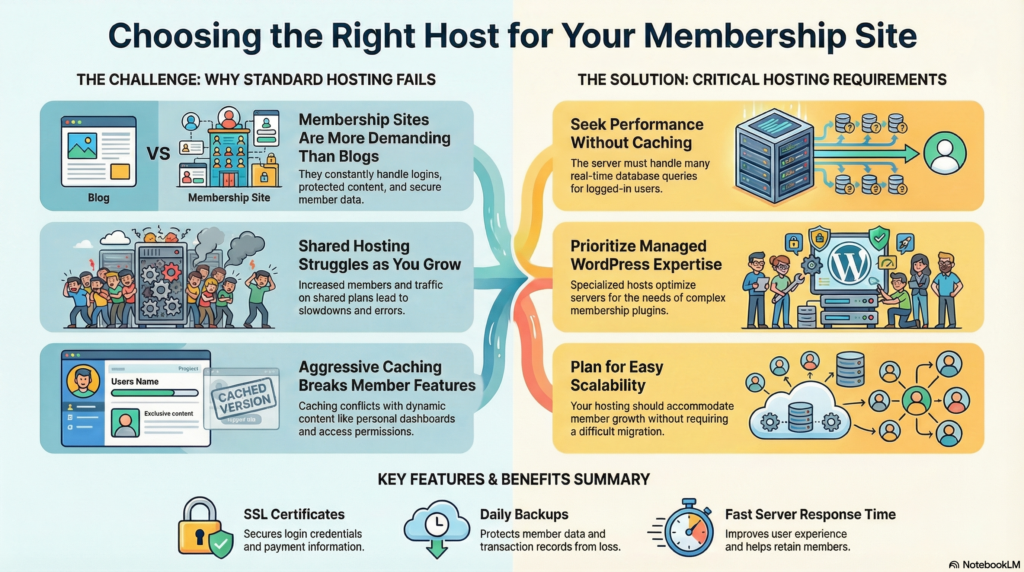
Quality web hosting services optimize their servers specifically for WordPress and membership plugins. They set up the database for getting the results quicker while having the right resources to handle many users at once.
Managed WordPress hosting usually comes with performance improvements that are designed to work with membership platforms. These optimisations take place at the level of the server, allowing the use of dynamic content.
Membership site owners should test load time for logged-in users as well as the homepage. The hosting environment must support real-time content delivery and not slow down. When serving authenticated users with personalized content, server response times matter more than cache hit rates.
Best Hosting Providers In 2025
There are a number of hosting providers that stand out for membership sites based on performance, support quality, and specialized features. Each has its own unique benefits in terms of infrastructure, scalability, and WordPress.criteria.
WP-Tonic
WP-Tonic specializes in hosting for membership sites and learning management systems. The company focuses specifically on platforms like LearnDash, LifterLMS, and Creater LMS.
Their infrastructure includes optimized server configurations for membership plugins and online course delivery. WP-Tonic provides white-glove migration services and ongoing performance monitoring tailored to membership site requirements.
The hosting plans include automatic backups, staging environments, and CDN integration. Support staff members have expertise in troubleshooting membership-specific issues like payment gateway conflicts and user access problems.
Key Features:
- Specialized membership site optimization
- Expert support for membership plugins
- Managed WordPress environment
- Custom server configurations
Kinsta
Kinsta uses Google Cloud Platform infrastructure in 35 data center locations. The hosting provider has a containers-based technology which is made up of LXD containers and Nginx.
All plans come with backups, free CDN through Cloudflare, and staging environments. Kinsta’s dashboard has plenty of analytics for traffic and performance.
The company provides migration services that employ their own technicians. You can connect with WordPress experts via live chat for support any minute any day.
Pricing starts at:
- Starter: $35/month (25,000 visits)
- Pro: $70/month (50,000 visits)
- Business plans scale with traffic needs
WP Engine
WP Engine offers managed WordPress hosting with tools suited for high-traffic membership sites. EverCache and auto-updates are part of the platform’s proprietary caching technology.
All plans come with their Genesis Framework and StudioPress themes. WP Engine provides the ability to transfer installs which allows clients to manage multiple sites.
Security features monitor, lock and repair threats. The server environment installs vulnerable plugins automatically and provides SSL certificates at no extra charge.
With higher tiers, a phone support and chat support are available 24/7. Git integration, SSH access, and local development environments are all development tools.
Rocket.net
Rocket.net Setup for Speed and Modern Cloud Infrastructure. Across all the plans, the providers offer enterprise NVMe storage and Cloudflare Enterprise CDN.
The custom stack incorporates Redis object caching, PHP 8.2, and HTTP/3 support. To help mitigate stress to the servers we get certain membership site launches, we implement edge caching on Rocket.net.
With unlimited free migrations, the platform offers automatic image optimization. Backups are kept for 30 days and restore with one click.
Performance Features:
- Sub-100ms response times
- Automatic scalability
- Built-in image compression
- Advanced caching layers
Cloudways
Cloudways is a managed cloud hosting platform that provides users access to several infrastructures. Users select between DigitalOcean AWS Google Cloud Linode Vultr
The control panel is easy to use. You can manage your cloud servers without expertise. Cloudways provides vertical scaling features to enhance server resources as membership sites develop.
Features included Breeze Cache plugin, Cloudflare CDN and automatic backup. With hourly billing choices, customers only pay for server resources utilized.
Server management involves control of PHP version, staging environment and team work. Customer support tickets and live chat, but not available via phone.
Pantheon
Pantheon focuses on agency-grade hosting with advanced development workflows. The platform is built on a container-based infrastructure that scales automatically in response to traffic spikes.
They have independent dev, test, and live environment in WebOps. Pantheon’s Global CDN includes HTTPS and 50+ edge locations around the world by default.
The hosting provider works alongside versioning software and has automated testing functions. New Relic monitoring included for performance and bottleneck tracking.
To understand our pricing please contact sales, as pricing is site by site by visit by feature. Enterprise plans for large membership sites include dedicated resources and advanced security features.
Frequently Asked Questions
What should I consider when choosing a web host for my membership site?
When selecting a web host for your membership website, the performance, reliability and security of the site matters. These influence how the site operates and the members experience it. Look for uptime guarantees, locations of servers, and CDN options that assist in speeding up the site as you grow. If you use WordPress and a membership plugin, you should check whether the web hosting provider offers managed hosting services or premium managed WordPress hosting plans. Ensure to check on backup policies, SSL support for accepting payments online, scalability so you are not migrating constantly as you grow your membership.
Is managed hosting or shared hosting better for starting a membership site?
The majority of people starting your membership, a managed host or managed WordPress hosting plans are a better option for membership sites because they come with optimized servers, automatic updates, and security features that reduce maintenance. You can, at first, create your membership using a shared solution at little cost. Unfortunately, however, shared resources and performance limitations will hurt your speed and user experience as your site grows. If you envision quick expansion or anticipate needing to manage payments effortlessly in the future, it’s worth considering VPS or dedicated hosting for better management and more power.
Which web hosts specialize in membership sites and WordPress membership website on WordPress?
Some hosting companies claim to be great membership site hosting but only offer hosting for WordPress and membership plugin providers. Choose a host that offers staging, PHP/MySQL stacks and integrates with popular membership plugins and payment gateways – these factors are critical for easy membership website building! When searching for the right web hosting provider, you will likely want to compare comparison hosts offering managed hosting services, premium managed WordPress hosting or membership site option. All of these provide your website with better uptime than other hosts. Plus, you can expect better customer support too.
How will my choice of hosting affect accepting payments and member management?
How smoothly you can accept payments online and manage members depends on the right web host. Having hosting with SSL, PCI-compliance, reliable backups, and good uptime minimizes payment errors and security risks. It is critical because payments online make membership sites viable. A managed host can ease compliance and performance tuning while poor hosting can cause downtime during the billing cycle or slow pages that escalate churn. Before you start building, always check that the payment gateway is compatible with your membership plugin.
When should I upgrade from shared hosting to VPS or dedicated hosting for my membership site?
Improve your membership by upgrading as the site speed or member experience suffers. Also upgrade after you exceed your resource limits or if you consistently have spikes in traffic as your memberships grow. Choosing a web host that has a variety of hosting tiers makes the transition easier; look for the one with providers that make it easy to scale from shared-to-VPS or dedicated hosting. For membership to perform optimally, VPS or dedicated hosting becomes an essential choice if you are running advanced features, high-resolution media, or multiple overlapping video streams. Picking the right web hosting provider for your membership site from the get-go helps you avoid frantic migrations and downtime as you grow.
Final Thoughts
Significant consideration should be given to technical requirements when selecting a web hosting for a membership site. Membership sites require more resources than a typical website because of user authentication, content access restrictions, and frequent database queries.
Key factors to prioritize include:
- Server performance and uptime guarantees
- Scalability options as membership grows
- Security features like SSL certificates and regular backups
- Technical support availability and expertise
Shared hosting is good enough for small membership sites. But most of them should quickly do this. For a majority of membership sites, VPS hosting or managed WordPress hosting provides the ideal balance of price and performance. Dedicated hosting is for large businesses with thousands of members actively online.
The membership site hosting should easily integrate with membership plugins and have a history of supporting membership services. These steps allows you to solve problems more easily.
While budgets matter, going for the lowest price often means having problems later on. Opting for a hosting plan that costs a bit more but includes better performance, security, and support will save you time and money in the long run.
The hosting environment influences the experience of members through speed, up-time and security. These elements impact retention rates and the effectiveness of a membership enterprise. Utilizing trail periods to test out different hosting options will help discover the perfect fit without any commitments.


