

WordPress Membership Site Hosting on Kinsta: Complete Guide to Managed Solutions
However, we want to show you how to set up a membership site with WordPress the right way. To any successful membership platform requires the right hosting solution which is capable of handling repeat payments, restricted content, and consistent member engagement without facing performance issues.
Kinsta is a managed WordPress hosting platform that uses a specialized, Google Cloud-built infrastructure that meets the unique demands of a membership site, from member login abilities to subscription renewal capabilities. Services for dedicated managed WordPress are perfect for sites with membership functionality as they are much faster, safer and more scalable than shared hosting options.
Understanding WordPress Membership Sites
WordPress membership sites create exclusive spaces where site owners control access to content, services, or communities through user registration and subscription models. These platforms generate recurring revenue while building engaged audiences around specialized content or services.
What Is a WordPress Membership Site?
A WordPress membership site limits viewers to content their membership grants to them. Site owners set access rules that define what registered members can view (or download or interact with) compared to non-members or visitors.
The core functionality depends on user authentication systems that validate member credentials and membership status. Plugins that add membership functionality to standard WordPress installations exist without requiring development.

There are various business models for membership sites. Some charge a fee once for lifetime access while others charge a fee on a subscription basis monthly or yearly. Premium upgrade routes are often created by free membership tiers alongside them.
Benefits of Creating Membership Websites
Membership sites generate predictable money through subscription payments. Because of the financial stability, site owners are able to plan investments in content, platform, and community.
Membership platforms help content creators develop stronger rapport with audience. Having direct access to your members allows personalized contact, feedback collection, and community engagement that standard blogs cannot match.
People think something is better if it’s exclusive. Members who pay for access are more engaged and consume more content than casual visitors. Gated content offers a form of intellectual property protection and creates scarcity that drives conversions.
Membership models give you insights on your users and their behavior. Site owners analyze content performance, audience engagement and content discovery to develop future content strategies.
Essential Features of Membership Sites
Membership platforms rely on content restriction controls to function. With these tools, admins will enable you to grant access control at the page, post, category or custom post type level for membership levels.
Integrating a payment gateway allows for automatic billing and subscriptions. You can make use of Stripe, PayPal, Authorize.net gateways for processing payments, recurring charges, payment security etc.
Members can update account profiles, negotiate changes to their passwords, and manage alternate subscriptions payment history. Capabilities of self-service can reduce overhead and enhance the experience.
Key technical features include:
- Drip content scheduling to release materials gradually
- Member directories for community networking
- Discussion forums or commenting systems
- Email automation for onboarding and engagement
- Reporting dashboards tracking signups, churn, and revenue
Common Use Cases for Membership Platforms
Membership sites are used by online course creators to deliver learning content. Both students and teachers are able to track progress while accessing all resources online.
Private communities are created by use of industry organizations and professional associations where members can communicate with each other, share a knowledge base, network, acquire access to research or become certified.
These platforms tend to have job board and event management capabilities.
Content publishers leverage subscription models to monetize journalism research or entertainment. Members get unlimited access to exclusive articles, videos or podcasts hidden from non-members.
Consultants and coaches offer membership programs with both self-paced materials and live group calls. While recorded content can be found in the lower tiers, one-on-one consulting or exclusives workshops come in premium levels.
Software companies develop customer portals through which members can access documents, support resources, and products.
Fundamentals of WordPress Membership Functionality
The WordPress membership functionality can be broken down into three components. First, manage user accounts and access levels. Second, control what content members can access. Finally, securely process payment transactions.
Membership Management Basics
Membership sites on WordPress require a system to register users, manage user profiles and assign membership tiers. Most membership plugins add new user roles on top of WordPress’s default ones. This means you can define your own access levels for members like Bronze, Silver, and Gold.
It allows you to keep track of every user’s subscription status, renewal dates and access rights. A dashboard for administrators to review member activity, manually adjust memberships, and cancel or upgrade.
Key management features include:
- User registration and login forms
- Member profile pages with customizable fields
- Bulk member import and export capabilities
- Email notifications for account events
- Member directory and search functionality
Automated user provisioning speeds up the process by immediately providing access when members complete registration or payment.
Content Restriction Methods
Content restriction controls access between memberships for pages, posts, and/or other site elements. WordPress Membership Plugins Provide Multiple Restriction Methods For Various Content Strategies.
Members can only access content through page restrictions. Individual blog posts or custom post types are controlled by restrictions following posts. Partial content dripping reveals content over time or based on your membership duration.
Some plugins allow you to restrict based on categories, so the rules apply to all content in the given categories. Shortcode-based restrictions allow you to hide a paragraph or section in a single page.
Depending on the login status, navigation menus may show and hide. Links to download videos or course materials have separate restriction rules from regular content.
Payment Integration Strategies
Payment integration is links membership access to financial transactions through payment gateways. Popular options for gateways are Stripe, PayPal and Authorize.net, each with their own fees and payment options.
Membership sites usually use a one-off payment, subscription, or hybrid model. Payment gateway’s API requires the management of subscriptions and automatic processing of chargebacks.
A COMPLETE STEP-BY-STEP CHEATSHEET
TO CREATING, LAUNCHING & GROWING A SUCCESSFUL MEMBERSHIP WEBSITE

Payment failures, subscription upgrades and downgrades, and refunds should be handled by system. The majority of membership plugins connect payment status to content access, and when payments are no longer processed, access is automatically revoked.
SSL certificates are essential for payment pages. Gateway webhooks alert the WordPress site to payment events made elsewhere such that the membership status stays in sync with actual payments.
Choosing the Best Hosting Solutions for Membership Sites
Membership sites require unique infrastructure capabilities that don’t apply to simple websites, especially in security, performance scaling and resource allocation.
Member experience and functionality will mostly depend on your choice of shared, managed, or cloud hosting.
Key Hosting Requirements for Membership Websites
Because membership sites query information about users, subscription status, and access rights, they are database-intensive. When hosting solution is frequently reading from and writing to the database, the pages should not load slowly. Also, the user must not experience any login issues caused due to such frequent activity.
Membership websites require an SSL certificate since they capture important user information and payment details. The hosting provider must have automatic SSL renewal and support for secure payment gateway integrations.
As the membership grows allocations are important. A site with a community of 500 active members logging in daily will require far more RAM and CPU power than a normal blog. The hosting plan must provide scalable capacities that change based on concurrent user sessions.
Essential technical requirements include:
- PHP 8.0 or higher for WordPress compatibility
- MySQL 5.7+ or MariaDB 10.3+ for database management
- Minimum 2GB RAM for sites with 100+ members
- CDN integration for global content delivery
- Automated daily backups with easy restoration
Types of Hosting: Shared, Managed, and Cloud
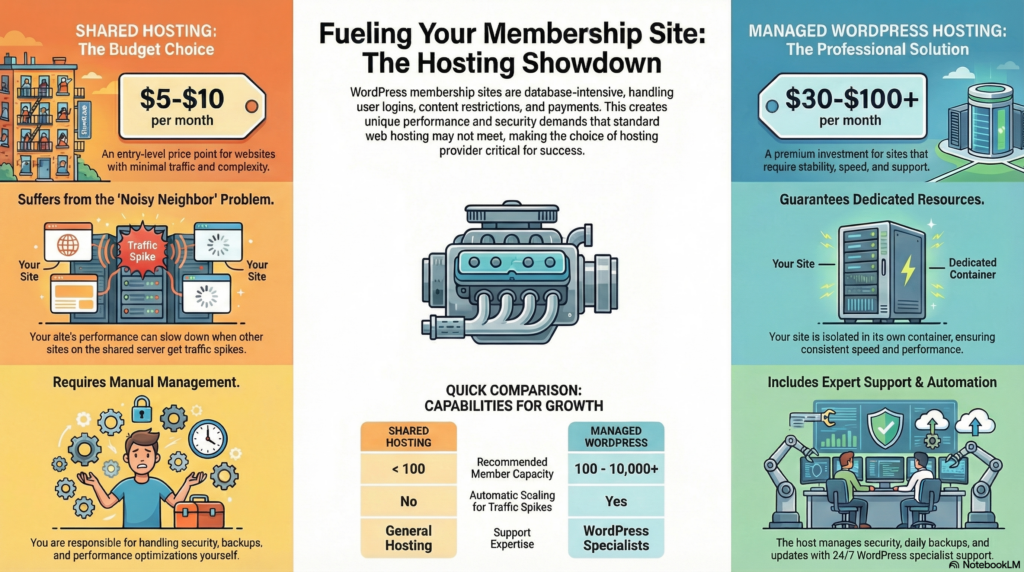
Shared hosting is when many websites are installed on a single server. This means all websites share the server’s resources. This solution, priced at $5-10 monthly, creates performance problems for membership sites when other sites cause traffic spikes.
Managed WordPress hosting delivers better performance for your site. Kinsta and other providers use container technology that isolates each site from another. Monthly fee for these plans is $30-35 + and comes with automatic updates, caching and stagings.
Cloud hosting utilizes infrastructure from multiple servers. Many managed WordPress hosts leverage Google Cloud Platform to auto-scale during heightened membership activity. The architecture ensures there will be no downtime when the traffic is high, for example during a course launch or content release.
Comparing Hosting Providers for WordPress Membership Sites
Kinsta’s hosting is specifically designed for membership sites that get a lot of traffic. The 24/7 support crews will also be familiar with MemberPress, Restrict Content Pro, and other membership plugins.
| Feature | Shared Hosting | Managed WordPress | Enterprise Cloud |
|---|---|---|---|
| Monthly Cost | $5-10 | $30-100 | $100+ |
| Member Capacity | <100 | 100-10,000 | 10,000+ |
| Database Optimization | Basic | Advanced | Custom |
| Automatic Scaling | No | Limited | Yes |
Site Health Hosting Provider dashboard should report on member activity, resource usage, and site performance. Enhanced hosting solutions offer testing environments for administrators to validate changes in membership tiers before going public.
The PHP settings and memory limits for WordPress membership themes. The hosting service should allow the settings to be changed easily without having to get access to the server or open a support ticket.
The Advantages of Managed WordPress Hosting
Managed WordPress hosting offers infrastructure and support that has been specially designed for WordPress sites with particular advantages for membership sites that need stable performance and security. Where your website is hosted makes a difference in speed and reliability as well as administration.
What Is Managed WordPress Hosting?
Managed WordPress hosting is when your hosting provider takes care of all the technical details for your WordPress website. The host takes care of server setups, software upgrades, backups and security patches.
Plans include caching designed specifically for WordPress, staging environments, and expertise provided by WordPress professionals. Providers such as Kinsta build their infrastructure on platforms like Google Cloud, using container technology to isolate each site.
WordPress performance is optimized through server-level configurations not found on general hosting. Integrated into the hosting dashboard is PHP version management, database optimization and CDN integration.
Benefits of Managed Hosting for Membership Sites
Membership websites make frequent database calls as users log in, view content, and access restricted areas. Managed hosts enhance database efficiency and apply sophisticated caching that considers logged-in users accessing dynamic content.
Key advantages include:
- Automatic scaling during traffic spikes when launching new courses or content
- Enhanced security with malware scanning and DDoS protection at the server level
- Daily backups with one-click restoration options
- Staging environments for testing membership plugin updates before deploying to production
- Expert support familiar with membership plugins and common configuration issues
The support team can assist you in troubleshooting membership themes, payment gateways and caching issues. Response times are usually quicker than shared host providers with some providing access 24/7 to WordPress specialist.
Managed Hosting vs. Shared Hosting
With shared hosting, multiple websites are placed on the same server sharing CPU, memory and bandwidth. If there’s a surge in traffic or a security issue on a site, the other sites fail to load.
Each site gets its own resource with managed WordPress hosting. Depending on your hosting plan tier, the resources of the server will scale. Thus, no issues with performance will occur. This will be true even if one of your neighbor sites is performing poorly.
| Feature | Managed WordPress | Shared Hosting |
|---|---|---|
| WordPress updates | Automatic | Manual |
| Server resources | Dedicated per site | Shared pool |
| Caching | WordPress-specific | Generic or none |
| Support expertise | WordPress specialists | General hosting support |
| Average load time | 300-600ms | 800-2000ms |
A shared hosting service leaves site owners to manage their own security, updates and optimizations. Solutions that manage such things automatically do lessening the technical knowledge needed to keep a membership site going.
Why Move to Kinsta for Your Membership Site
Kinsta’s WordPress hosting gives you enterprise-class infrastructure, all thanks to Google Cloud Platform. Plus, it comes with membership site-friendly and expert support. The migration is managed by specialists, and the hosting environment meets the specialized performance requirements of sites with frequent members and gated material.
Key Reasons to Choose Kinsta
Kinsta uses Google Cloud Platform’s premium tier network which means your data is delivered faster than most shared hosting providers use standard tier networks. The facilities automatically scale up their infrastructure to meet peaking demand when members log in at the same time or when any content goes live.
Each site is isolated from containerized technology on our platform. By using a unique server, it means that other sites cannot slow the performance of your membership site during peak times, something that is known as the noisy neighbour problem.
Kinsta offers features specially created for WordPress membership sites. They feature speed-boosting Redis object caching, Cloudflare CDN integration, and staging environments where the membership site owners test the latest membership plugin updates before applying them on production.
The Package Includes Daily Automatic Backup with One-Click Restoration. This matters for membership sites because user data, subscription records, and payment information must not be impacted by a plugin issue or failed update.
Migration Process to Kinsta
The migration is handled for you by the Kinsta support team at no additional cost. The team transfers files, databases, and configurations while ensuring that team member access and subscriptions remain uninterrupted.
The migration specialists will coordinate the timing of the project to minimize any further disruption. They take care of DNS changes and SSL certificate installation and ensure membership plugins work as it should in the new server environment before domain switch.
Owners of the site get a staging URL to check the migrated site. This allows testing of the login feature, payment gateways and content restrictions whether everything is working fine.
Most migrations are usually completed in 24-48 hours for a standard membership site. Websites that have more complex needs – custom integrations, large media libraries and more – may take longer, but the support team can provide a time frame on request.
Support Team and Customer Experience
Kinsta offers 24/7 email and chat support through their WordPress experts. The average response time is under 2 mins. Our team can respond to issues that are specific to your membership; plugin compatibility, caching conflicts with member-only content, and database optimisation, to name a few.
The support staff has an established access to logs on the server, allowing them to track performance bottlenecks on membership sites. They help with issues such as slow member dashboard loads, checkout page errors, or email delivery issues for membership notifications.
MyKinsta dashboard shows the statistics of PHP performance, cache hit rate as well as usage patterns. Membership site owners can see which page or function uses the most resources and work with support to optimize it.
Documentation for popular membership plugins available (for free) – MemberPress, Restrict Content Pro, and Paid Memberships Pro – is maintained by Kinsta. The knowledge base outlines configuration best practices for hosting membership sites and resolving common issues.
Evaluating Kinsta’s Hosting Plans and Features
Kinsta’s managed WordPress hosting is based around tiered plans that scale from personal sites to enterprise deployments. Each tier uses Google Cloud Infrastructure and contains performance optimization tools, auto-backups, and access to a dedicated support team.
Overview of Kinsta Hosting Plans
Kinsta offers a total of ten core hosting plans. These plans range from the Starter tier to Enterprise 4. Each plan specifies the limits on WordPress installs. It also defines the limits on monthly visits and storage. The Starter plan consists of one WordPress site with 25,000 visits per month and 10 GB disk space. Enterprise 4 has 150 sites 3,000,000 visits/month and 250 GB disk space.
All tier includes the same basic features as all other tier. All our users get free SSL certificates integration with Cloudflare CDN staging and automatic daily backups. All tiers of the hosting provider offer hack fix guarantee and uptime monitoring.
Every plan you sign up for will come with a specific amount of PHP workers that will process requests to your site. Higher packages offer increased PHP workers to manage concurrent traffic more efficiently. The number of workers directly determines the number of concurrent requests a membership site can handle without performance degradation.
Kinsta Pricing Tiers
Kinsta has a $35 Starter plan as well as an Enterprise 4 plan for $1500 a month. If purchased annually, you can get 2 free months and the effective monthly cost will drop. The pricing model is related to resource allocation, not features.
Starter Plan ($35/month)
- 1 WordPress installation
- 25,000 monthly visits
- 10 GB disk space
- 50 GB CDN bandwidth
Pro Plan ($70/month)
- 2 WordPress installations
- 50,000 monthly visits
- 20 GB disk space
- 100 GB CDN bandwidth
Business Plans ($115-$675/month)
- 5-40 WordPress installations
- 100,000-1,000,000 monthly visits
- 30-120 GB disk space
Premium DDoS protection and managed migrations require additional fees. Bandwidth overages cost $1 per GB for CDN and $2 per GB for visits exceeding the plan limit.
Integration With Google Cloud
Kinsta uses Google Cloud Platform to host its web services at 37 data centers. During the site setup, users can choose their desired data center via the dashboard. This infrastructure allows access to Google’s C2 compute-optimized virtual machines and premium tier network.
The site isolation of the hosting service utilizes Linux containers and is orchestrated by LXD. Every WordPress website is powered by a dedicated container with specific CPU and RAM allocations. This design prevents the performance of the membership site from being influenced other sites.
Kinsta is able to conduct maintenance on its hardware and system without downtime thanks to Google Cloud’s live migration technology.
It automatically scales of server resources during a traffic spike within the limits of the plan.
Scalability and Performance Benefits
Kinsta uses Nginx-level caching and allows for Redis object caching. PHP 8.0+ and MariaDB are configured by the hosting provider. These optimizations accelerate page load times for membership sites that require user authentication and dynamic content.
The CDN’s bandwidth allocation is automatically scaled according to actual usage within your plan. Website administrators can upgrade or downgrade their site’s hosting tiers from the dashboard without having to do manual migrations. The support team manages transition process and usually executes tier changes in a minute.
As websites move to higher tiers, Kinsta allocates more PHP workers. A Business 2 plan gets 4 PHP workers. Enterprise plans get 8-12 PHP workers. When several users log in, view content, and transact at the same time, membership sites benefit from this scale.
Optimizing WordPress Membership Sites on Kinsta
Through managed WordPress hosting, Kinsta has powerful infrastructure to run membership sites. The platform includes performance tools, security features and assurance facilities as per the requirements of membership sites.
Performance Optimization Best Practices
Kinsta’s own server-level caching system optimizes performance for membership content and supercharges web performance through faster page loads. The staging environment uses newer versions of PHP and HHVM support which gives faster execution speed for your WordPress core file and membership plugins.
Automatic daily backups along with other features to remove unnecessary data is the database optimization accomplished. Kinsta utilizes Google Cloud Platform’s premium tier network to deliver low latency connectivity for members from different geographical locations accessing content.
Key performance features include:
- CDN integration with Cloudflare for static content delivery
- Automatic image optimization through the MyKinsta dashboard
- Redis support for persistent object caching
- PHP workers allocation based on hosting plan tier
The staging environment is utilized to test membership plugin updates and theme tweaks without disturbing live site performance. When you may want to introduce a new membership plan or add a payment gateway.
Security Measures for Membership Platforms
Kinsta offers premium level security to safeguard sensitive member and payment information. The hosting service scans all sites for malicious code every two minutes and protects the servers with hardware firewalls and DDoS detection.
Member login pages and payments are secured automatically with SSL certificates that are bundled in. Kinsta prevents network-level unauthorized access attempts before they even reach your WordPress installations.
Security infrastructure includes:
- Two-factor authentication for MyKinsta dashboard access
- IP geolocation blocking capabilities
- Automatic WordPress core updates
- Isolated container technology for each site
The support team keeps an eye on security threats around the clock and responds quickly to possible vulnerabilities. You can roll back your membership site to a specific backup restore point if there is a security issue with Kinsta.
Uptime and Reliability Considerations
Kinsta guarantees a remarkable 99.9% uptime as per its service level agreement. The hosting provider uses redundant systems to ensure membership sites remain online during spikes in traffic or when the server is down.
When your members try to access content at the same time, your site won’t slow down because it uses Load Balancing. It automatically spreads your traffic/calls over the available servers during peak time. This is especially critical for membership sites where live events and course launches or content release take place.
Through the MyKinsta dashboard, you can monitor uptime and visitor stats in real-time while tracking performance and analytics. Kinsta uses reliable infrastructure with automatic failover systems that switch to backup servers if the primary fail. As such, members always have access.
Selecting the Best Membership Themes for WordPress
The perfect membership theme makes managing your site easy and gives a seamless experience while properly integrating with membership plugins and hosting. The theme selection for membership-based websites impacts the functionality and performance.
Factors to Consider in Membership Themes
When choosing membership themes, performance optimization is an important consideration. When it comes to membership sites with protected content areas and frequent user logins, lightweight themes with clean code help them load faster and consume fewer server resources.
How smoothly the site works depends on compatibility with membership plugins like MemberPress, Restrict Content Pro or Paid Memberships Pro. Some themes have membership directly whereas others need a plugin.
Key technical considerations include:
- Mobile responsiveness for members accessing content across devices
- Page builder compatibility with Elementor, Beaver Builder, or Gutenberg
- Security features supporting protected content delivery
- Customization options without requiring extensive coding knowledge
Documentation quality and developer support affect long-term maintenance. Themes with regular updates adapt to WordPress core changes and security patches.
Popular WordPress Membership Themes
BuddyBoss is a great option for membership sites that want to focus on community. This theme comes with social networking features, course delivery, and member profiles. The theme works with LearnDash and has white-label functionality for branding purposes.
The visual builder of Divi offers vast flexibility and it is compatible with all popular membership plugins. The lifetime license option is favored browser contact lens for developers of multiple membership sites.
Astra is one of the fastest themes and uses very few resources. The starter templates feature designs specific to members. They integrate seamlessly with WooCommerce for paid membership.
Kadence’s performance is coupled with its built-in header and footer builders, eliminating plugin dependability. It efficiently manages the login areas and restricted content.
Custom Theme Development
With custom themes you get complete control over design, functionality, and member experience. The development charges of an application depend on its complexity and features.
Organizations opt for personalized creation in cases where existing themes cannot accommodate their unique membership structure, payment flow, and content delivery method. Custom solutions get rid of unneeded code and features that weigh down a pre-built theme.
The development should comply with WordPress coding standards and security best practices to protect member data and be scalable for future growth. Custom themes need to be compatible with managed WordPress hosts, like Kinsta.
The general timeline for development from plan and launch is 6-12 weeks. In-house development or an agency relationship is needed for ongoing maintenance to upgrade.
Managing Your Site and Hosting With the WordPress Dashboard
The WordPress dashboard is your main control panel for your membership site. It gives you direct access to your plugins, users, and stats. Using this interface, site owners can monitor member activity, modify hosting settings, and analyze traffic patterns.
Overview of the WordPress Dashboard
WordPress Dashboard reflects a customizable designed interface where widgets display site health, activity and quick links to quick functions. The left sidebar is the main navigation menu, the tools Are arranged under posts, media, pages, users, and settings.
For membership sites, the dashboard includes a different set of menu items from installed plugins. Located beneath the usual WordPress options, these enable member management, subscription and payment handling. The upper toolbar is present on all pages. It directs you to check out your site, comments and profile.
The Screen Options tab allows site owners to choose which widgets will display on the main dashboard screen. The information concerning new registrations, subscription expirations, and payment information can be prioritized. The warning for updates to WordPress core, theme or plugin will be displayed on the dashboard.
Managing Membership Plugins
Membership plugins insert their sections into the WordPress dashboard menu. You can use any of the popular plugins that offer this like MemberPress, Restrict Content Pro or Paid Memberships Pro to easily manage member, subscriptions and access rules from a dedicated menu area in your website.
The membership plugin interface usually comes with user lists which contain active, expired and pending members. Through a manual interface, administrators can add members, change their subscription levels, and grant special access without processing a payment. These tools also help enforce content restriction rules to manage which pages and posts are visible to which membership tiers.
Management of payment and subscriptions can be done in the plugin dashboard. The transaction history is available to the site owners where they can process refunds or handle failed payments. Most plugins work with email marketing services to automate the targeting of members based on their subscription status.
Monitoring Site Activity and Analytics
WordPress’ dashboard does come with some basic analytics like visitor count and popular posts. Kinsta hosting clients can access performance data through the MyKinsta dashboard. This includes bandwidth usage, visitor location, and cache information.
Track Your Membership Site’s Metrics Like Registrations, Member Retention And Content Engagement Connecting Google Analytics with a plugin like MonsterInsights and Site Kit gives you deeper insights. With these tools you can see traffic sources, site user behavior flows and conversion rates right in the dashboard of your WordPress website.
Plugins that generate activity log for members, login and content changes. This monitoring identifies security incidents, tracks member engagement and troubleshoots access issues. By analyzing these metrics regularly, we will upgrade our hosting plan while changing our content and membership price.
Making the Right Choice: Selecting Your Hosting Provider
Comparing Web Hosts for WordPress Membership Sites
Managed WordPress hosting providers like Kinsta operate on Google Cloud Platform infrastructure, offering automatic scaling and CDN integration. Shared hosting plans typically cost $3-15 monthly but limit resources across multiple sites on one server.
Key differences between hosting types:
| Hosting Type | RAM per Site | Support Level | Best For |
|---|---|---|---|
| Shared | 512MB-2GB | Basic tickets | Small sites under 1,000 members |
| Managed WordPress | 2GB-12GB+ | WordPress experts | Growing membership sites |
| VPS | 2GB-16GB | Technical support | Custom configurations |
Managed WordPress hosting includes automated backups, staging environments, and WordPress-specific caching. These features reduce the technical burden of running membership sites with protected content areas.
Kinsta and similar providers handle server optimization, security patches, and PHP updates automatically. Shared hosting requires manual configuration of these elements through cPanel or similar interfaces.
Evaluating Support and Service Options
Managed WordPress hosts usually have a support team that responds in 2-10 minutes via chat. They know how to troubleshoot database-slow plugins, WordPress membership plugins, and theme membership software compatibility.
Shared hosting providers mainly support web hosting and not WordPress. The teams manage basic server issues but can’t troubleshoot membership plugin conflicts or payment gateway integration conflicts.
Critical support features include:
- 24/7 availability through multiple channels
- WordPress-specific troubleshooting knowledge
- Staging environment access for testing
- Migration assistance from previous hosts
The support team needs to be familiar with the membership theme and plugins to resolve quicker. If you have a MemberPress, Restrict Content Pro, or Paid Memberships Pro then yes, faster than standard hosting support.
Tips for Choosing the Right Provider
Membership websites that process payments require SSL certificates, PCI compliance support and 99.9% uptime. The hosting plan should be capable of managing traffic surges when releasing new courses or promotions.
Check out the dashboard of the provider for user management and instant staging. Kinsta’s dashboard features real-time stats, membership activity tracking, and resource use by membership.
Determine your site’s projected monthly visitors and simultaneous logged-in users. Generally, a site with five thousand members needs a minimum of 4GB RAM for best performance assuming 10% concurrent usage during peak hours.
Inquire about the backup process and restore testing of the vendor. Your website is automatically backed up every day, and one click is needed to restore it.
check compatibility with required membership plugins and payment processors Some hosting companies block certain WordPress plugins that may interfere with their caching and security systems.
Final Thoughts
The selection of a WordPress membership site hosting depends on unique requirements and future growth expectations. Kinsta is a premium managed WordPress host that ensures powerful performance thanks to Google Cloud and more. The best thing is that it has features especially made for membership sites.
The site takes care of some of the most common hiccups that membership sites face with automatic scaling, daily backups, and on-demand experts. Website owners do not have to worry about technical details, like server optimization or security updates.
Kinsta is tiered pricing that lets businesses start with the right resources and upgrade their membership base. Switching to Kinsta from any other host is made easy with the migration service they offer.
Key considerations when evaluating Kinsta include:
- Budget alignment with hosting plan features
- Expected traffic and member activity levels
- Technical support requirements
- Integration needs with membership themes and plugins
While shared hosting seems a cost-effective solution initially, your membership site will likely perform better with managed WordPress hosting. Investing in quality hosting solutions safeguards revenue and member experience.
Before taking the plunge, site owners should compare their needs against Kinsta’s. This tool provides insight into the performance of a site and the resources being used. Membership sites need more resources than regular blogs or brochure sites and thus require different types of hosting.
Using the platform during any trial or money-back guarantee will help to check compatibility with themes and plugins on site.


